Besides providing application images, Docker also provides database images such as PostgreSQL, MySQL, MariaDB, MongoDB, and so on for its users. As with databases installed on a physical server, which requires entering a username and password to access it, Docker also requires you to enter a username and password to use the database, commonly known as an environment variable.
Problem
How to run environment variables in Docker?
Solution
An environment variable is a dynamically named value that can affect how running processes behave on a computer. They are part of the environment in which a process runs. For example, a running process can query the value of the TEMP environment variable to discover a suitable location to store temporary files, or the HOME or USERPROFILE variable to find the directory structure owned by the user running the process. To find out whether a Docker image can use environment variables, you must check the documentation of the Docker image. Still, in general, Docker images in the form of databases such as MySQL, PostgreSQL, or MongoDB use environment variables.
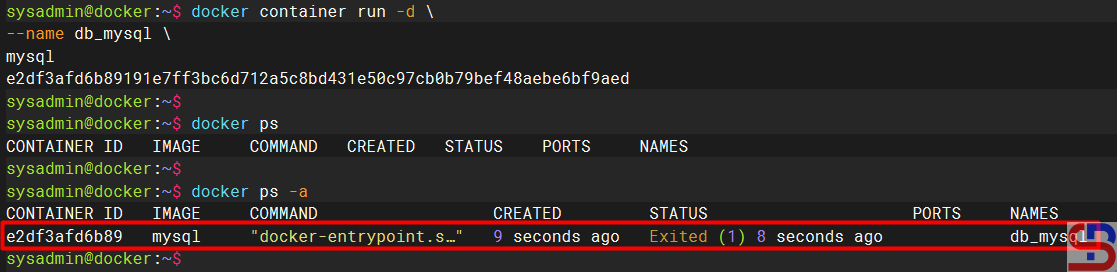
Please note that if you install an image container that uses an environment variable, for example, installing a MySQL database in a container, but you don’t include an environment variable like in the command below:
docker container run -d \
--name db_mysql \
mysql
The container will not run as shown in the image below:
Docker has parameters that we can use to send environment variables to the application contained in the container by adding the ‐-env or -e option when we create the container, following the format below:
docker container run -d --name container_name --env KEY1="value" --env KEY2="value" image:tag
This article will use the MySQL Docker image as a case example. In the documentation, several variables are provided, such as MYSQL_ROOT_PASSWORD, MYSQL_DATABASE, and so on. So, if you want to install MySQL in the container, you have to insert the environment variable. So, if you want to create a MySQL container with root password q1w2e3r4, then run the command below:
docker container run -d \
--name mysql_db \
-e MYSQL_ROOT_PASSWORD=q1w2e3r4 \
mysql
After that, try to access the MySQL database by running the command below:
docker container exec -it db_mysql mysql -pq1w2e3r4
You will enter the database in the container, like in the image below:
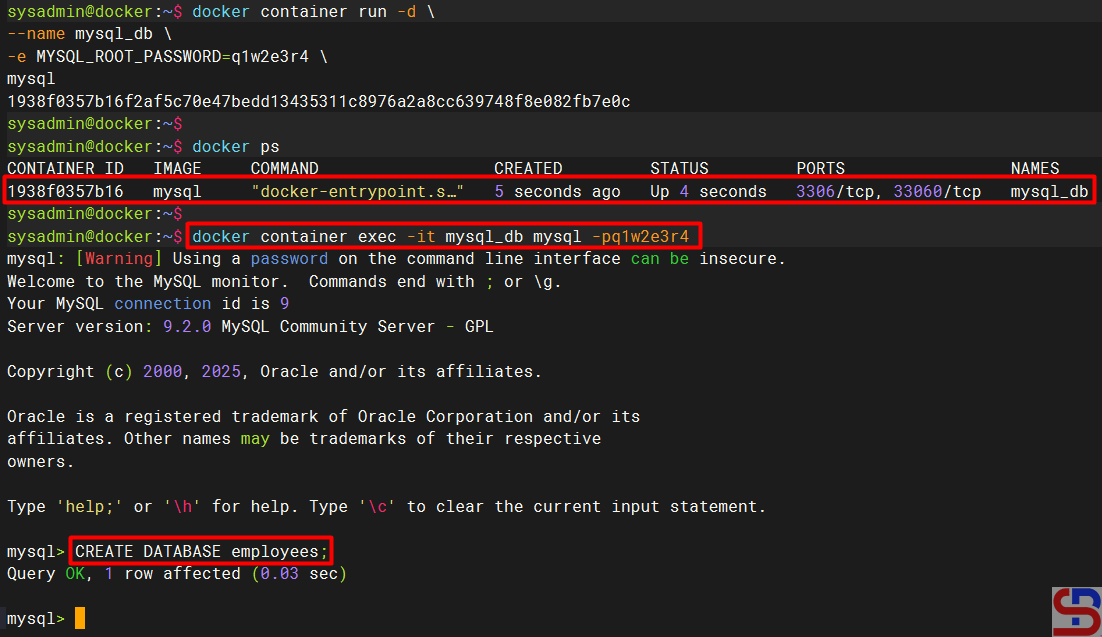
And you can use database commands as usual, like in the image above.
Note
Besides using the -e or ‐-env parameter arguments, you can use a file to save the environment variables, commonly known as Env-File, using the VAR=VALUE format. Use the format below to run the container that uses Env-File like in the format below:
docker container run -d --name container_name --env-file=filename container_name
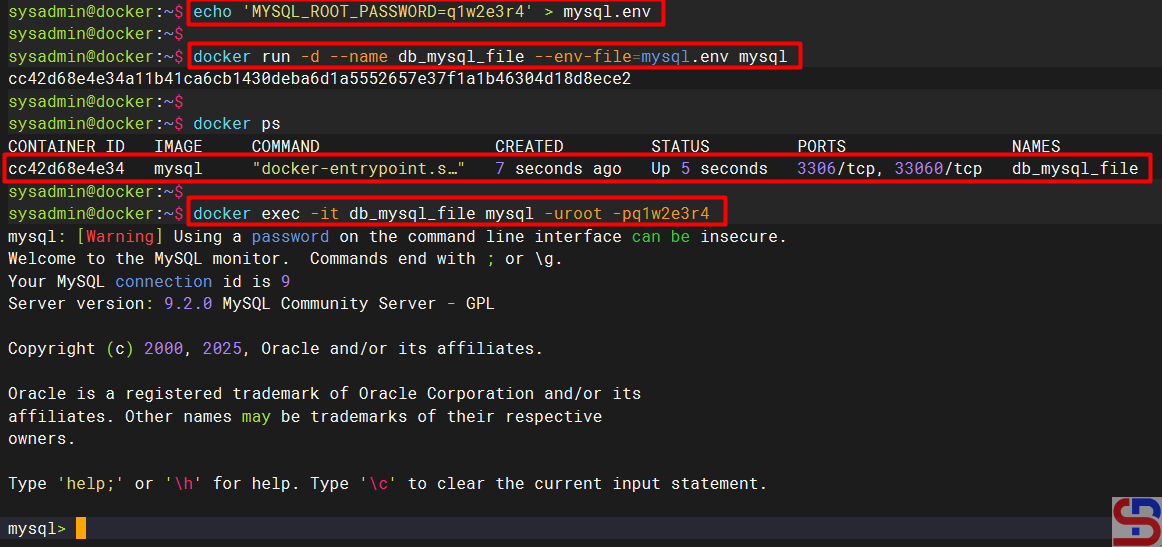
First, you create the file, which usually ends with .env or .env.prod or .env.dev, and I create mysql.env. After that, you add to the file the script below:
MYSQL_ROOT_PASSWORD=q1w2e3r4
Run the command below to create a new container for MySQL using the environment file:
docker run -d --name db_mysql_file --env-file=mysql.env mysql
The MySQL container will be created, and you can access the database in the container like in the command below:
References
youtube.dimas-maryanto.com
youtube.com
stackoverflow.com

