I want to know the total size of the entire MariaDB database.
Problem
How to display the total size of the entire MariaDB database in the CLI?
Solution
There are two methods for displaying the total size of the entire MariaDB database in the CLI:
1. Using a query
If you have entered the MariaDB database, you can use the command below to display the total size of a MariaDB database:
SELECT table_schema AS "Database",
ROUND(SUM(data_length + index_length) / 1024 / 1024, 2) AS "Size (MB)"
FROM information_schema.TABLES
GROUP BY table_schema;
The above query will display the total size of the entire MariaDB database in MegaBytes (MB) as shown in the image below:

If you want to display in Gigabytes (GB), use the command below:
SELECT table_schema AS "Database",
ROUND(SUM(data_length + index_length) / 1024 / 1024 / 1024, 2) AS "Size (GB)"
FROM information_schema.TABLES
GROUP BY table_schema;
so that it will display as shown in the image below:

2. Using Linux Command
If you want to display the total size of the entire MariaDB database using Linux commands, use the command below:
mariadb -u root -p -e "
SELECT table_schema AS 'Database',
ROUND(SUM(data_length + index_length) / 1024 / 1024, 2) AS 'Size (MB)'
FROM information_schema.TABLES
GROUP BY table_schema;"
If you run the above command, it will display like the image below:

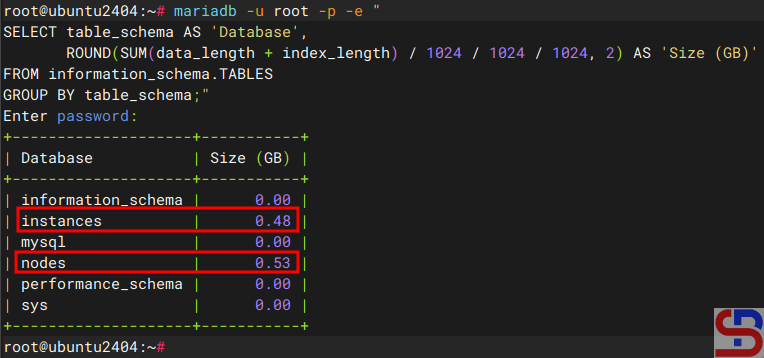
If you want to display it in GigaBytes, use the command below:
mariadb -u root -p -e "
SELECT table_schema AS 'Database',
ROUND(SUM(data_length + index_length) / 1024 / 1024 / 1024, 2) AS 'Size (GB)'
FROM information_schema.TABLES
GROUP BY table_schema;"
and it will display like the image below:
Or in a short time, you can use the Linux command below to see the total size of the entire database in MariaDB:
cd /var/lib/mysql/
du -sh *
Note
If you want to display the total size of the entire MariaDB database in KiloBytes, then in the ROUND(SUM(data_length + index_length) section, simply divide it by 1024 so that it becomes as follows:
mariadb -u root -p -e "
SELECT table_schema AS "Database",
ROUND(SUM(data_length + index_length) / 1024 , 2) AS "Size (KB)"
FROM information_schema. TABLES
GROUP BY table_schema;"
And if you want to display in TeraBytes size, then in the ROUND(SUM(data_length + index_length) section, divide by 1024 4 times, so that the command is as follows:
mariadb -u root -p -e "
SELECT table_schema AS 'Database',
ROUND(SUM(data_length + index_length) / 1024 / 1024 / 1024 / 1024 , 2) AS 'Size (KB)'
FROM information_schema.TABLES
GROUP BY table_schema;"
References
a2hosting.com
database.guide
tecmint.com

