By default, PostgreSQL uses port 5432. But for security’s sake, I want to change the default port to another one.
Problem
How to change the default port in PostgreSQL?
Solution
If you want to see the port used by PostgreSQL, you can see it in the postgresql.conf file by using the command (I’m using Ubuntu distro and PostgreSQL version 18):
cat /etc/postgresql/18/main/postgresql.conf | grep 'port ='
Or you can use the command below to see the PostgreSQL port:
sudo ss -ptuln | grep postgres
Or you can use the query in this post to see the port used by PostgreSQL:
SHOW PORT;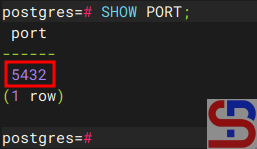
From the images above, you can see that PostgreSQL uses port 5432. If you want to change the PostgreSQL port to port 6543, for example, then go to the /etc/postgresql/18/main/postgresql.conf file if you use the Ubuntu distro and PostgreSQL version 18, and change the port value from 5432 to 6432.
sudo find / -type f -name "*postgresql.conf"
Then restart PostgreSQL using the command:
sudo systemctl restart postgresql
After that, you can check the PostgreSQL port by using one of the commands above, and the PostgreSQL port should have changed according to the port you want as shown in the image below:

Note
If you have changed the default port of PostgreSQL from 5432 to 6432, for example, then you don’t need to write the port in the Linux command to access PostgreSQL if you access from localhost:

But, if you access PostgreSQL from another host, you have to write the option for the port, like in the picture below:

References
stackoverflow.com
dbvis.com
geeksforgeeks.org

