By default, MariaDB uses port 3306. I want to change the default port to another port for security reasons.
Problem
How to change MariaDB port?
Solution
To see the default MariaDB port, you can use the command below:
sudo ss -ptuln | grep mariadb
Or you run the query below:
show variables like 'port';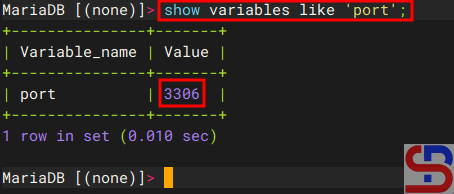
From the images above, you can see MariaDB is using port 3306. If you want to change the port from 3306 to 4306, for example, then in the file /etc/mysql/mariadb.conf.d/50-server.cnf if you are using Ubuntu, add the item below:
port = 4306
sudo find / -type f -name "*server.cnf"
Then restart mariadb using the command:
sudo systemctl restart mariadb
After that, you can check the MariaDB port by using one of the commands above, and the MariaDB port should have changed according to the port you want, as shown in the image below:

Note
If you have changed the default port of MariaDB from 3306 to 4306, for example, then you don’t need to write the port in the Linux command to access MariaDB if you access from localhost:

But, if you access MariaDB from another host, you have to write the option for the port, like in the picture below:

References
geeksforgeeks.org
stackoverflow.com
tecmint.com

