The previous articles have explained how to perform a database backup in MariaDB. This article will explain how to perform a database restore in MariaDB.
Problem
How to restore the database in MariaDB?
Solution
There are several methods to perform the database restore in MariaDB:
1. Restore the entire database
To restore the backup file of the entire database, use the format below:
mysql -u username -p < backup_file.sql
Use the command below if your backup file name is backup_all_databases.sql:
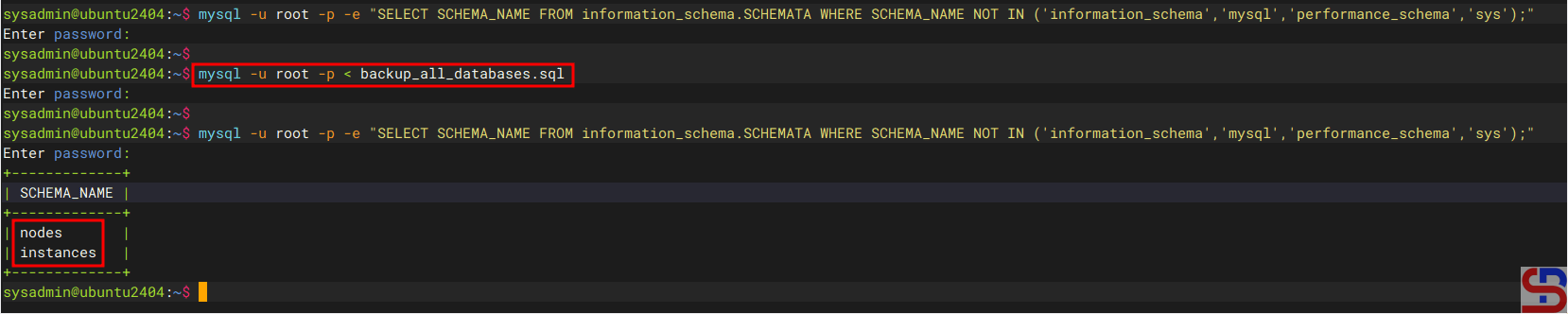
mysql -u root -p < backup_all_databases.sql
After you run the above command, the database will be restored in MariaDB as shown in the image below:
2. Restore a database
Use the following format to restore a database’s backup file:
mysql -u username -p -e'create database new_database;' < backup_file.sql
If you want to restore the nodes database, then you can use the command below:
mysql -uroot -p -e'create database nodes;' < backup_nodes_db.sql
After you run the command above, MariaDB will restore the database like in the image below:

3. Restore the table(s)
If you want to restore the table(s), you can follow the format below:
mysql -u username -p db_name < table_backup_file.sql
So, use the command below if you want to restore the tables in the nodes database:
mysql -u root -p nodes < table_backup_file.sql
4. Restore a compressed backup file
There are two methods to restore a compressed backup file:
a. Restore the .gz backup file
If you want to restore a .gz backup file, use the format below:
gunzip < database.sql.gz | mysql -u username -p -e'create database new_database;'
For example, if you want to restore a database that uses .gz compression, then use the command below:
gunzip < nodes_backup_db.sql.gz | mysql -u root -p -e'create database nodes;'
b. Restore the .gz backup file
If you want to restore a .bz2 backup file, use the format below (but make sure your server has already installed the bzip2 package):
bunzip2 < database.sql.bz2 | mysql -u username -p -e'create database new_database;'
For example, if you want to restore a database that uses .bz2 compression, then use the command below:
bunzip2 < nodes.sql.bz2 | mysql -u root -p -e'create database nodes;'
Note
You can restore a database backup file that is compressed using method number 4, whether you compress when backing up the database or after backing up the database.
References
mariadb.com
stackoverflow.com
serverfault.com
bitbook.io

