How to Move a File/Folder From the Server to the Container And Vice Versa?
The previous article explained how to access a container in Docker. Now, I need to move a file/folder from the server to the container and vice versa.
Problem
How to move a file/folder from the server to the container and vice versa?
Solution
These are how to move a file/folder from the server to the container and vice versa:
A. Move from the server to the container
To move a file from the server to the container, use the format below:
docker cp src_path container:dest_path
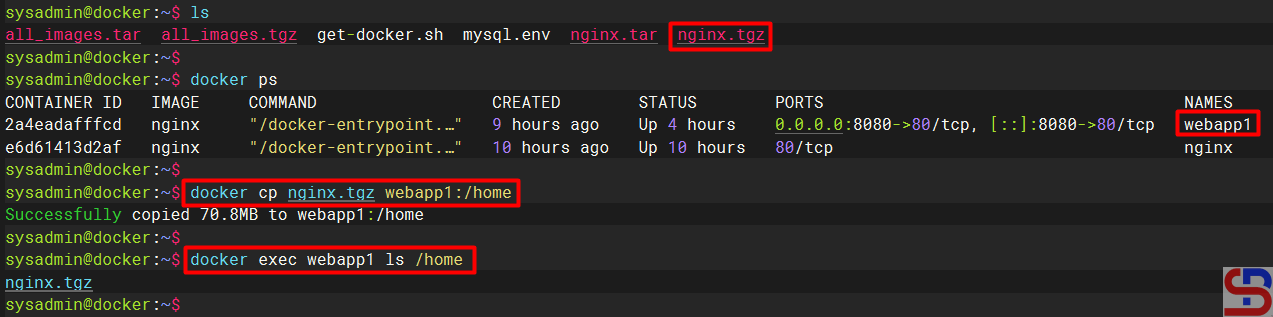
For example, I want to move the nginx.tgz file from the server to the webapp1 container in the folder /home, so I use the command below:
docker cp nginx.tgz webapp1:/home
And the file will move to the /home folder in the container, like in the image below:
B. Move from the container to the server
To move a file from the server to the container, use the format below:
docker cp container:src_path dest_path
For example, you want to move the docker-entrypoint.sh file in the container to the server in the folder /tmp, use the command below to move the file:
docker cp webapp1:docker-entrypoint.sh /tmp
And the file should be transferred to the folder /tmp on the server as shown below:

Note
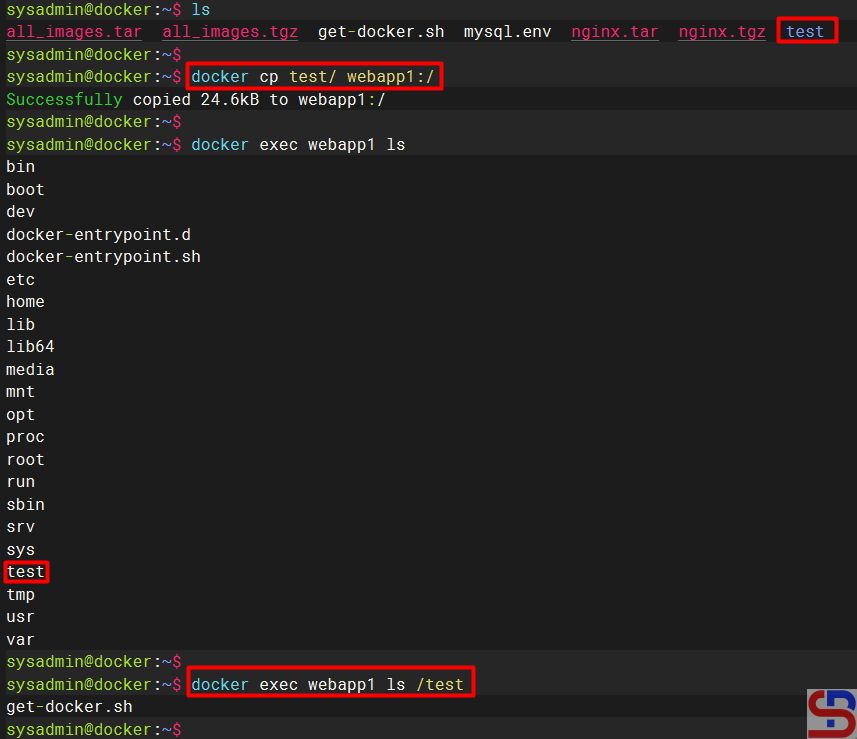
You can move the folder and its contents from the server to the container and vice versa by using the format above without the need to add the -r option, as shown in the image below: