I would like to know who is running crontab on the Linux server.
Problem
How to display all crontabs running using a Bash script?
Solution
By default, run the command below if you want to display the crontab command:
crontab -l
However, if you want to display another user, for example, user john, use the command below:
sudo crontab -l -u john
If you want to see all users running crontab, then you can run the command below:
Ubuntu/Debian
ls -l /var/spool/cron/crontabs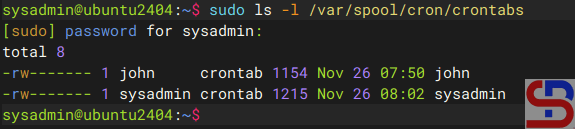
RockyLinux/AlmaLinux/RHEL/CentOS
ls -l /var/spool/cron/
Use the command below if you want to see all users running crontab and display each user’s crontab at the same time:
awk -F: '$3>=1000 || $1=="root" {print $1}' /etc/passwd |
while read u; do
    if sudo crontab -l -u "$u" &>/dev/null; then
        echo
        echo "=== $u ==="
        sudo crontab -l -u "$u" | grep -v '^#' | sed '/^\s*$/d'
        echo ""
    fi
done
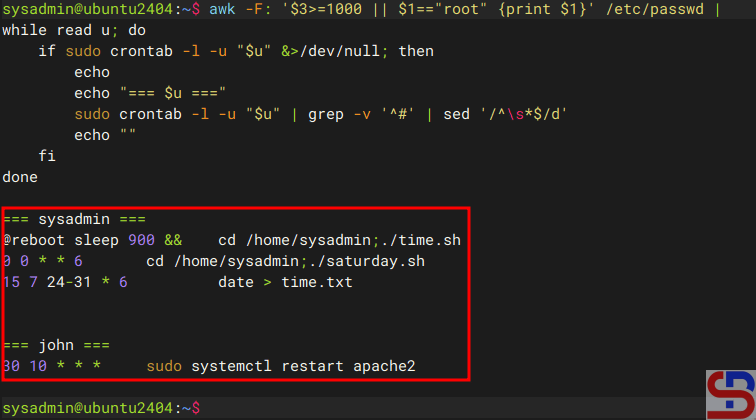
If you want the result of the above command to be entered as a CSV file, then run the command below:
echo "user,cron_entry" > all_user_crontab.csv; \
awk -F: '$3>=1000||$1=="root"{print $1}' /etc/passwd | while read u; do \
    if sudo crontab -l -u "$u" &>/dev/null; then \
        sudo crontab -l -u "$u" | \
        grep -v '^[[:space:]]*#' | grep -v '^[[:space:]]*$' | \
        while read line; do \
            echo "$u,\"$line\"" >> all_user_crontab.csv; \
        done; \
    fi; \
done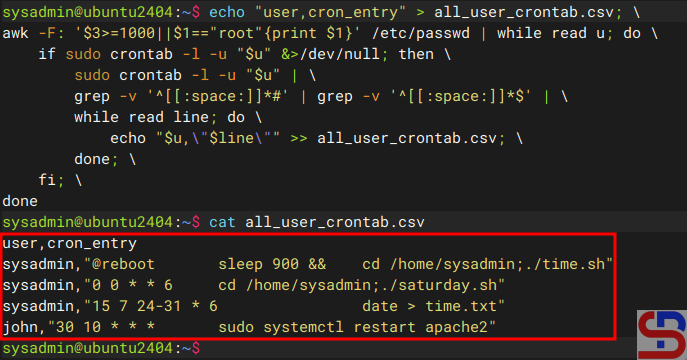
However, if you want to display all crontabs, whether run by the user or the Linux system, then you can use the command below:
#!/bin/bash

clean_output() {
    grep -v '^[[:space:]]*#' | grep -v '^[[:space:]]*$'
}

echo "=== SYSTEM CRONTABS ==="
echo ""

# Main crontab system
if [[ -f /etc/crontab ]]; then
    echo "--- /etc/crontab ---"
    clean_output < /etc/crontab
    echo ""
fi

# Cron.d directory
if [[ -d /etc/cron.d ]]; then
    echo "--- /etc/cron.d/ ---"
    for f in /etc/cron.d/*; do
        [[ -f "$f" ]] || continue
        echo "File: $f"
        clean_output < "$f"
        echo ""
    done
fi

# Cron.daily, cron.hourly, cron.weekly, cron.monthly
for dir in daily hourly weekly monthly; do
    path="/etc/cron.$dir"
    if [[ -d "$path" ]]; then
        echo "--- /etc/cron.$dir/ ---"
        # List script names only (normally no '#' inside)
        ls -1 "$path"
        echo ""
    fi
done

echo "=== USER CRONTABS ==="
echo ""

# All user in /etc/passwd
for user in $(cut -f1 -d: /etc/passwd); do
    uid=$(id -u "$user" 2>/dev/null)
    [[ $? -ne 0 ]] && continue
    if [[ $uid -lt 1000 && $user != "root" ]]; then
        continue
    fi

    crontab_content=$(sudo crontab -l -u "$user" 2>/dev/null | clean_output)

    if [[ -n "$crontab_content" ]]; then
        echo "--- Crontab for user: $user ---"
        echo "$crontab_content"
        echo ""
    fi
done
And use the script below if you want to insert the result into a CSV file:
#!/bin/bash

OUTPUT="cron_inventory.csv"

echo "type,owner,source,cron_entry" > "$OUTPUT"

filter_clean() {
    grep -v '^[[:space:]]*#' | grep -v '^[[:space:]]*$'
}

#############################################
# SYSTEM CRONTAB
#############################################

if [[ -f /etc/crontab ]]; then
    cat /etc/crontab | filter_clean | while read line; do
        echo "system,root,/etc/crontab,\"$line\"" >> "$OUTPUT"
    done
fi

#############################################
# /etc/cron.d
#############################################

if [[ -d /etc/cron.d ]]; then
    for file in /etc/cron.d/*; do
        [[ -f "$file" ]] || continue
        cat "$file" | filter_clean | while read line; do
            echo "system,root,$file,\"$line\"" >> "$OUTPUT"
        done
    done
fi

#############################################
# cron.daily / cron.hourly / cron.weekly / cron.monthly
#############################################

for dir in daily hourly weekly monthly; do
    path="/etc/cron.$dir"
    if [[ -d "$path" ]]; then
        for script in "$path"/*; do
            [[ -f "$script" ]] || continue
            echo "system,root,$path,$(basename "$script")" >> "$OUTPUT"
        done
    fi
done

#############################################
# USER CRONTABS
#############################################

for user in $(cut -f1 -d: /etc/passwd); do
    uid=$(id -u "$user" 2>/dev/null)
    [[ $? -ne 0 ]] && continue
    if [[ $uid -lt 1000 && $user != "root" ]]; then
        continue
    fi

    crontab -l -u "$user" 2>/dev/null | filter_clean | while read line; do
        echo "user,$user,crontab,\"$line\"" >> "$OUTPUT"
    done
done

echo "== CSV generated: $OUTPUT =="
Note
By displaying users who use crontab on a Linux server, you can save your time and effort investigating if there are commands running at a certain time on that server.
References
stackoverflow.com
unix.stackexchange.com
cyberciti.biz

