How to Configure Firewalld to be Port Forwarding?
Port forwarding is a networking technique used to redirect communication requests from one port number to another port number, typically across a network boundary such as a router or firewall. This technique can be used with Firewalld, available in RockyLinux, or derivative distros from RHEL such as AlmaLinux, CentOS, and others.
Problem
How to configure Firewalld to be port forwarding?
Solution
If you want to see the command in firewalls to run port forwarding, type the below command:
firewall-cmd --help | grep forward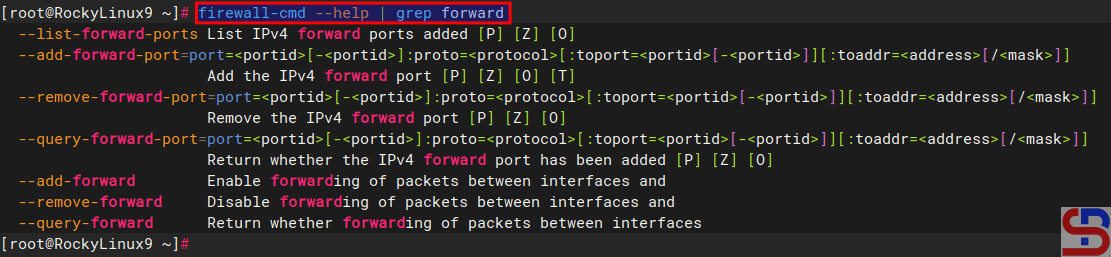
There are 2 methods of port forwarding: forward the connection of a port to one IP/device and forward the connection of a port to a different IP/device.
A. Forward to the same IP/device
By default, you must use the format below to forward a port in a device:
firewall-cmd --add-forward-port=port=port-number:proto=tcp|udp|sctp|dccp:toport=port-number
You can add an option ‐-permanent if you want the rule to remain after reloading or rebooting the system. For example, you have a server with IP 192.168.56.2 where port 22 on the server is closed so to access the server via SSH must use port 43210. If you follow this article, then you must type the command below to access the server:
ssh sysadmin@192.168.56.2 -p 43210
However, by implementing a port forwarding you can access the server without typing the port. Let’s say, the firewalld is in the device, then on the device open port 43210 using the command:
sudo firewall-cmd --add-port=43210/tcp --permanent
sudo firewall-cmd --reload
In the file /etc/sshd/sshd_config, change the port to be as below:
Port 43210
After that restart SSH by using the command:
sudo systemctl restart sshd
After that, type the commands below to configure the forwarding port in the firewalld:
firewall-cmd --add-masquerade --permanent
firewall-cmd --add-forward-port=port=22:proto=tcp:toport=43210 --permanent
firewall-cmd --reload
firewall-cmd --list-all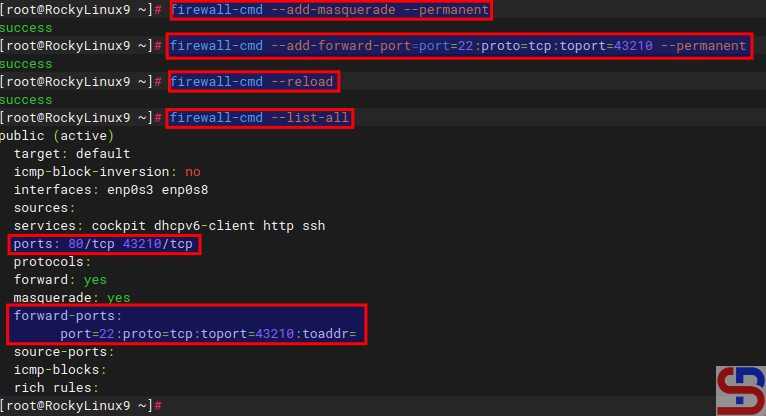
type the command below to access the server via SSH:
ssh sysadmin@192.168.56.2
You should be able to enter the server without having to type the 43210 port as shown below:

B. Forward to a different IP/device
By default, use the format below to forward a port to a different IP/device:
firewall-cmd --add-forward-port=port=port-number:proto=tcp|udp|sctp|dccp:toport=port-number:toaddr=ip_address
If you want the rule to stay in place after a system reboot or reload, you can add a ‐-permanent option. As an illustration, suppose you have a server with IP address 192.168.56.2 and port 22 is available. You would like users who access port 22 to forward to port 22 with IP address 192.168.56.102. Use the command below to configure firewalls:
firewall-cmd --add-masquerade --permanent
sudo firewall-cmd --add-forward-port=port=22:proto=tcp:toport=22:toaddr=192.168.56.102 --permanent
firewall-cmd --reload
firewall-cmd --list-all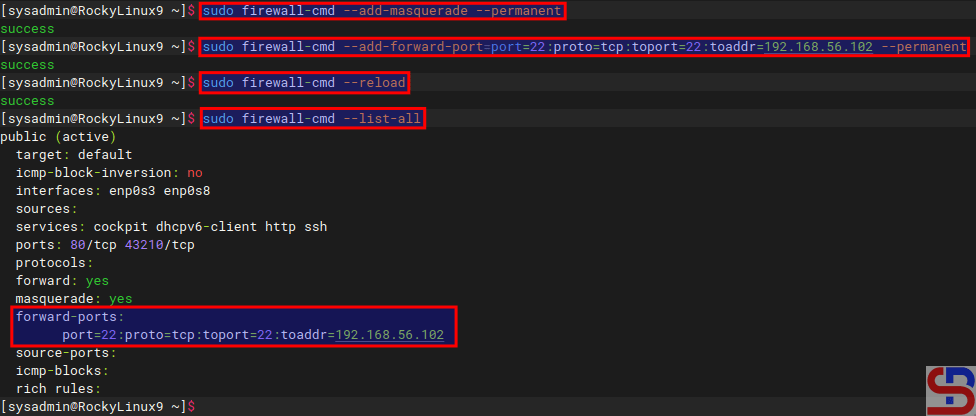
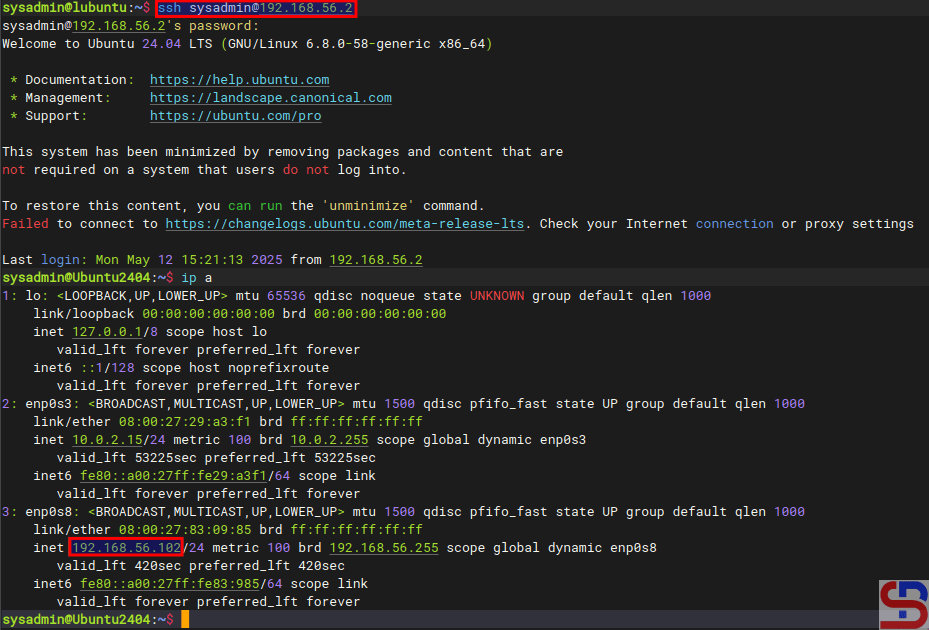
If you type the command below:
ssh sysadmin@192.168.56.2
You will be forwarded to a server that uses IP 192.168.56.102 as shown below:
Note
To see rule forwarding is in the rule in the firewall, besides being able to use the firewall-cmd ‐-list-all command, you can also use the command below:
sudo firewall-cmd --list-forward-ports
then you will see the results as shown below:

And if you want to delete a rule port forwarding in the firewall, then you can simply change the options ‐-add-forward-port to ‐-remove-forward-port so the command will change like in the command below:
sudo firewall-cmd --add-forward-port=port=22:proto=tcp:toport=22:toaddr=192.168.56.102 --permanent