PostgreSQL, also known as Postgres, is a free and open-source Relational Database Management System (RDBMS) emphasizing extensibility and SQL compliance.
Problem
How to install PostgreSQL on a Linux server?
Solution
In this article, I use the Linux distro RockyLinux server version 9.5, Ubuntu Server version 24.04, and OpenSUSE version 15.6. As of this writing (January 2025), the version of PostgreSQL that has been released is version 17.2.
A. Install PostgreSQL
Here is how to install PostgreSQL on some Linux distros:
RockyLinux
dnf install -y https://download.postgresql.org/pub/repos/yum/reporpms/EL-9-x86_64/pgdg-redhat-repo-latest.noarch.rpm
dnf -qy module disable postgresql
dnf install -y postgresql17-server
/usr/pgsql-17/bin/postgresql-17-setup initdb
systemctl enable postgresql-17
systemctl start postgresql-17
Ubuntu
sudo apt install curl ca-certificates
sudo install -d /usr/share/postgresql-common/pgdg
sudo curl -o /usr/share/postgresql-common/pgdg/apt.postgresql.org.asc --fail https://www.postgresql.org/media/keys/ACCC4CF8.asc
sudo sh -c 'echo "deb [signed-by=/usr/share/postgresql-common/pgdg/apt.postgresql.org.asc] https://apt.postgresql.org/pub/repos/apt $(lsb_release -cs)-pgdg main" > /etc/apt/sources.list.d/pgdg.list'
sudo apt update
sudo apt -y install postgresql
sudo systemctl enable postgresql
sudo systemctl start postgresql
Debian
sudo apt install curl ca-certificates
sudo install -d /usr/share/postgresql-common/pgdg
sudo curl -o /usr/share/postgresql-common/pgdg/apt.postgresql.org.asc --fail https://www.postgresql.org/media/keys/ACCC4CF8.asc
sudo sh -c 'echo "deb [signed-by=/usr/share/postgresql-common/pgdg/apt.postgresql.org.asc] https://apt.postgresql.org/pub/repos/apt $(lsb_release -cs)-pgdg main" > /etc/apt/sources.list.d/pgdg.list'
sudo apt update
sudo apt -y install postgresql
sudo systemctl enable postgresql
sudo systemctl start postgresql
OpenSUSE
sudo zypper install -y postgresql17-server
sudo systemctl enable postgresql
sudo systemctl start postgresql
If you want to install the latest version of PostgreSQL, go to this page and choose based on your Linux distro.
B. Connect to PostgreSQL
Now, connect to PostgreSQL using the command below:
sudo -u postgres psql
Note
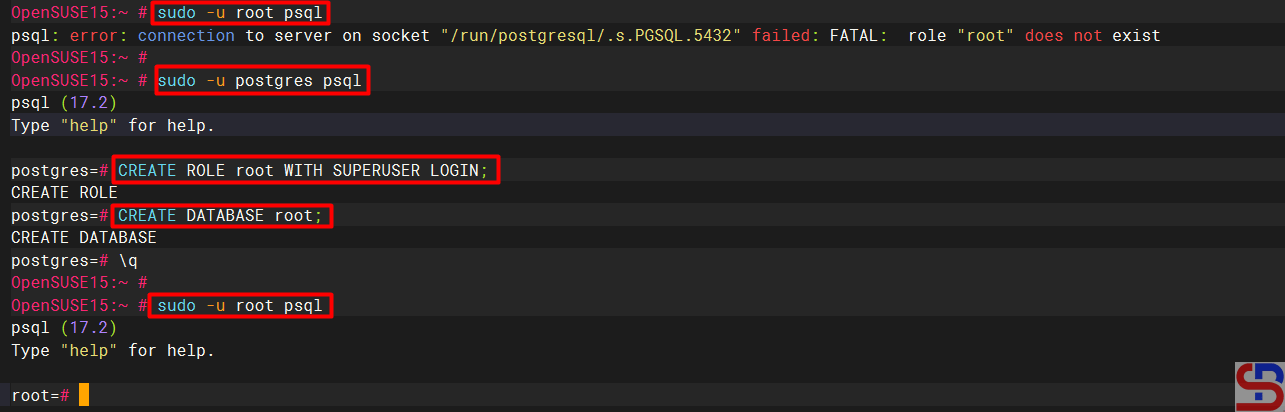
By default, only Postgres users can enter the PostgreSQL server, so you run the command sudo -u postgres psql to connect to PostgreSQL. If you want to connect to PostgreSQL using other users, such as the root user, use the command below:
sudo -u root psql
There will be an error like below:
psql: error: connection to server on socket “/run/postgresql/.s.PGSQL.5432” failed: FATAL: role “root” does not exist
So, you have to define a new role for the root user. Connect to PostgreSQL, and run the command below:
CREATE ROLE root WITH SUPERUSER LOGIN;
CREATE DATABASE root;
\q
After that, try to connect to PostgreSQL using the root user; it should connect to PostgreSQL as shown in the image below:
References
en.wikipedia.org
postgresql.org
devart.com
neon.com
openbasesystems.com

