The previous article explained how to convert a column into a row in a Linux file. This article will explain how to convert a row into a column.
Problem
How to convert a row to a column in a Linux file?
Solution
Suppose you have a test.txt file as below:

Use the command below to convert the file into a column:
tr -s ' ' '\n' < test.txt
Then the file will become like the image below:
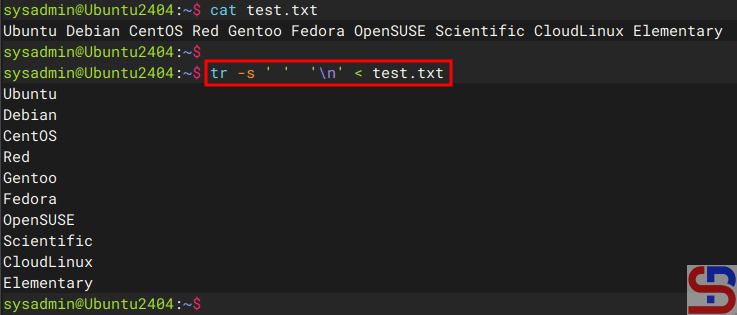
Or you can use the command below:
fmt -1 test.txt
so that the file will be as shown in the image below:

Note
If you want to enter the results in a file, for example, the result.txt file, then you can use the standard output redirection or stdout on Linux. For example, you use the tr command to change the file, so you can use the command below:
tr -s ' ' '\n' < test.txt > result.txt
Then the results of these changes are in the result.txt file as shown below:

Likewise, by using another command above, you can simply add stdout at the end of the command.
References
unix.stackexchange.com
odin.mdacc.tmc.edu

