How to Check a Public IP in the Spam List Using a PHP Script?
The spam list is a list of public IPs that spread spam based on the analysis made by various institutions (DNSBL or Domain Name System Blacklists) such as Spamhaus, SpamCop, and so on. This list is handy because by looking at this list, sysadmins know which public IPs are on the spam list, so they can take analysis and actions regarding their mail servers. So, I want to see if a public IP is in the spam list on the internet or not in my Linux serve,r so that I no longer need to search the internet for its status.
Problem
How to check a public IP in the spam list using a PHP script?
Solution
There are 2 solutions if you want to see if a public IP in the spam list on the internet or not in your Linux server, using a PHP script or a bash script. In this article, I use a PHP script to detect if a public IP is in the spam list on the internet or not, and I created a simple site to make it easier to check a public IP. I use the PHP application and Apache web server, and I use Ubuntu (but you can use any Linux OS you like). Install the applications needed to create the site:
sudo apt-get install apache2 php
After that, copy the script below and name the file check_ip_spam.php:
<html>
<head>
<title>DNSBL Lookup Tool - IP Blacklist Check Script</title>
</head>
<body>
<CENTER>
<h1>Check IP SPAM</h1>
<form action="" method="get">
<input type="text" value="" name="ip" placeholder="Insert a Public  IP ..." />
<input type="submit" value="LOOKUP" />
</form>

<?php
/***************************************************************************************
This is a simple PHP script to lookup for blacklisted IP against multiple DNSBLs at once.

You are free to use the script, modify it, and/or redistribute the files as you wish.

Homepage: http://dnsbllookup.com
****************************************************************************************/
function dnsbllookup($ip){
        $dnsbl_lookup=array(
        "bl.spamcop.net",
        "cbl.abuseat.org",
        "dnsbl.justspam.org",
        "dnsbl.sorbs.net",
        "relays.mail-abuse.org",
        "spam.dnsbl.sorbs.net",
        "spamguard.leadmon.net",
        "zen.spamhaus.org"); // Add your preferred list of DNSBL's

if($ip){
        $reverse_ip=implode(".",array_reverse(explode(".",$ip)));
foreach($dnsbl_lookup as $host){
        if(checkdnsrr($reverse_ip.".".$host.".","A")){
                $listed.=$reverse_ip.'.'.$host.' <font color=red>Listed</font><br />';
                }
        }
}

if($listed){
        echo $listed;
}else{
        echo "<font size=4>IP $ip <b>not listed</b> in SPAM list</font>";
        }
}

$ip=$_GET['ip'];

if(isset($_GET['ip']) && $_GET['ip']!=null){
        if(filter_var($ip,FILTER_VALIDATE_IP)){
                echo dnsbllookup($ip);
}else{
        echo "<font color=red><font size=4>Please enter a valid IP</font></font>";
        }
}

?>

<br>
<br>

<table border="0">
        <tr><td><b>This website use multiple DNSBLs:</b></td></tr>
        <tr><td>bl.spamcop.net</td></tr>
        <tr><td>cbl.abuseat.org</td></tr>
        <tr><td>dnsbl.justspam.org</td></tr>
        <tr><td>dnsbl.sorbs.net</td></tr>
        <tr><td>relays.mail-abuse.org</td></tr>
        <tr><td>spam.dnsbl.sorbs.net</td></tr>
        <tr><td>spamguard.leadmon.net</td></tr>
        <tr><td>zen.spamhaus.org</td></tr>
</table>

</CENTER>
</body>
</html>
After that, open your browser and type the URL below:
http://ip_server_address/check_ip_spam.php
Then there should be a display like below:
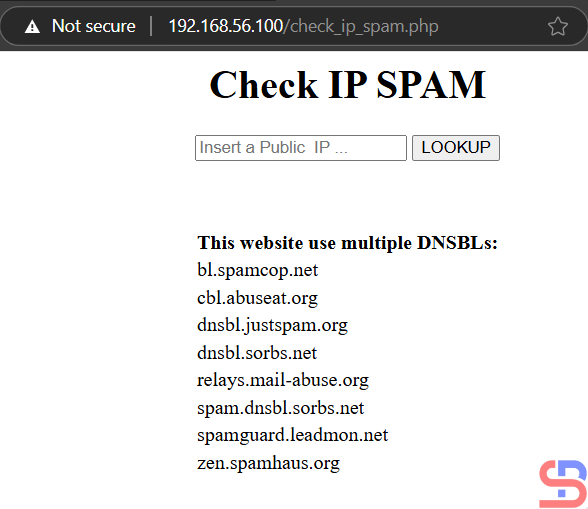
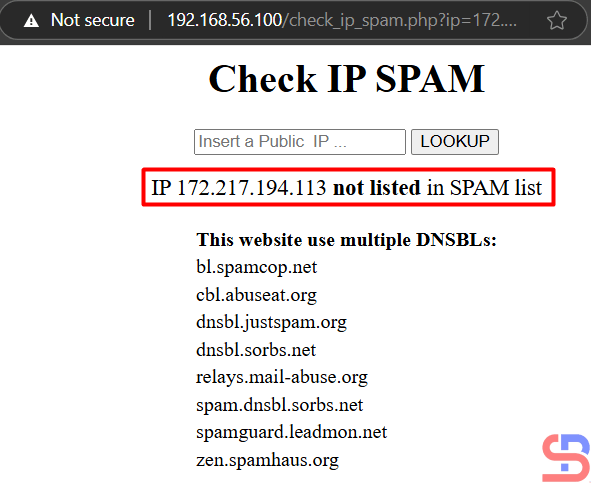
Enter the IP you want to check in the public IP field, such as IP 172.217.194.113, then press the LOOKUP button, then there will be results like the picture below:
If the public IP that you put in the spam list, e.g., IP 24.209.96.220, then the result is like in the image below:

If you are wrong to enter a public IP, there is an error like the image below:

Note
If you want to change the DNSBL or Domain Name System Blacklists list, then you can change it in lines 23-30 of the script and you can add the DNSBL list here. The more you enter the DNSBL list, the more valid the output will be.