How to Make a Linux User Have the sudo Function?
SUDO stands for “SuperUser DO” and it is a program for Unix-like computer operating systems that enables users to run programs with the security privileges of another user, by default, the superuser. With sudo, a normal user can install or delete an application, change the server network, or even reboot or shut down the server.
Problem
How to make a Linux user have the sudo function?
Solution
This article will explain how to make a Linux user have the sudo function on RockyLinux/AlmaLinux/CentOS, Ubuntu/Debian, and OpenSUSE distros. For example, you want to add the user john to these distros and want that user to be able to use the sudo function. As far as I know, there are two methods to do it:
1. Change the sudoers file
Open the /etc/sudoers file or use the command below:
visudo
Add to the file the user name as in the image below:

After that, save the file and then try to add a new user using the user john, if there is a display like the image below:
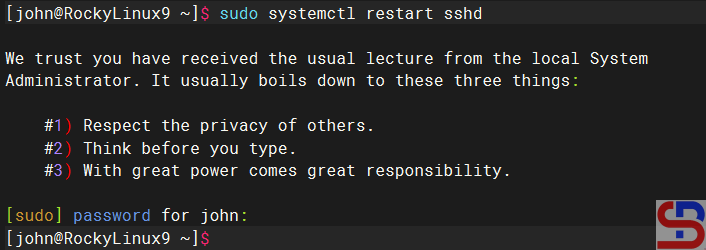
Then select number 1, and the user should successfully add a new user as in the image above.
2. Add the user to the sudo group
Add the user to the sudo group, where the name of this sudo group can vary in each distro. To see the name of the sudo group, look in the sudoers file and look for a sentence similar to ‘Allows people in group to execute any command‘. For example, in RockyLinux and OpenSUSE, the name of the sudo group is wheel, sudo in Ubuntu, and don’t forget to make sure to uncomment the section as in the image below:

Then type the command below so that a user can use sudo:
RockyLinux & OpenSUSE
usermod -aG wheel john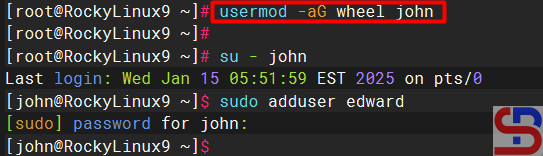
Ubuntu/Debian
usermod -aG sudo john
Note
The two methods above can provide the sudo feature to a user on Linux so that the user can run commands that can only be executed by root if the user uses the sudo command by writing down the password. However, if you want the bob user not to have to enter a password when running the sudo command, then in the sudoers file, type the script below:
bob ALL=(ALL) NOPASSWD: ALL
Use the command below if you want the robin user to only be able to perform reboot commands using sudo, but not other commands using sudo:
robin ALL=(ALL) /usr/sbin/reboot