How to Get The Value Between Two Special Characters on Linux?
I need to get a value between 2 special characters I use for my other purposes in the log file on the Linux server.
Problem
How to get the value between two special characters on Linux?
Solution
Special characters are the punctuation characters on your keyboard, such as !, @, #, and so on. After I searched on the internet, there were 2 solutions to get the value between these two special characters: using the grep command or using the cut command.
1. Using the grep command
To get the value between two special characters using the grep command, use the following format:
grep -Po "(?<=\special_character).*?(?=\character_special)"
For example, if the special character is brackets or (), then the format above changes to:
grep -Po "(?<=\().*?(?=\()"
Type the command below to get the value between the brackets:
echo "(test)" | grep -Po "(?<=\().*?(?=\))"
Look at the example in the image below:

2. Using the cut command
To get the value between two special characters using the grep command, use the following format:
cut -d "special_character" -f2 | cut -d "special_character" -f1
For example, if the special character is pound or #, then the format above changes to:
cut -d "#" -f2 | cut -d "#" -f1
Type the command below to get the value between the pounds:
echo "#test#" | cut -d "#" -f2 | cut -d "#" -f1
Look at the example in the image below:

Note
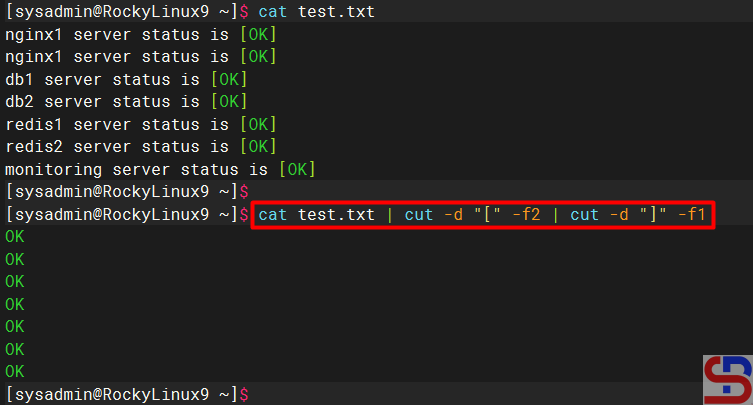
If you have a log file in Linux, for example, the content of the file is as image below:
nginx1 server status is [OK]
nginx1 server status is [OK]
db1 server status is [OK]
db2 server status is [OK]
redis1 server status is [OK]
redis2 server status is [OK]
monitoring server status is [OK]
You can use one of the commands above to get the value between 2 special characters, and I use the cut command as in the command below:
cat test.txt | cut -d "[" -f2 | cut -d "]" -f1