How to Fix the Hard Disk Size After Deleting Large Files?
I once deleted large files on my Linux server, but when I saw the disk size using the df -h command, it turned out that the hard disk size on the server had not changed.
Problem
How to fix the hard disk size after deleting large files?
Solution
I have a Linux server that has a hard disk size as shown below:

And you see the partition / only 17 percent left, and I want to delete large files on the server. After seeing in various partitions, I saw a large file in the log folder, as shown below:
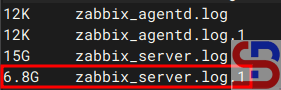
And I did the command to delete the file. But after deletion, the size of the hard drive on the server is still the same as in the image above. After I find out the reason why the hard disk size has not changed, it turns out this is due to the deleted files still held open by a process commonly known as the zombie file. As a result, the system cannot release the disk space occupied by these files. Because these files are marked as deleted, the df and du commands cannot account for their space usage. So, to see files that are still open by a process, use the lsof command. If on your Linux server, there is no lsof package, use the commands below to install the lsof package:
RockyLinux/AlmaLinux/CentOS
dnf install lsof
Ubuntu/Debian
sudo apt update
sudo apt install lsof
Use the command below to see the deleted files still held open by a process:
lsof +L1
And in my case, it will look like in the image below:

After that, use the command to delete the files using the kill command based on the pid number, as shown in the image below:
kill -9 111119 119254 119255 119256
And the above command should delete the process that uses the PID number, as shown in the image below:

And if you run the df -h command, the size of the hard disk on the Linux server should be reduced according to the size of the files that we deleted earlier, like in the image below:

Note
If, after you delete using a kill based on the PID number, but the size of the hard disk on the Linux server still hasn’t changed, then the server must be restarted, and after you restart the server, the size of the hard disk will correspond to the number of files you deleted earlier.
References
pietervogelaar.nl
howtoforge.com
access.redhat.com
alibabacloud.com