How to Download a Package With Its Dependencies in RockyLinux?
To install a package on RockyLinux distro which is a derivative of RHEL and derivatives such as AlmaLinux or CentOS and others, just type yum install or dnf install and follow by the name of the package to be installed, then the package will be directly installed immediately on the server. But sometimes I just want to download a package with its dependencies for some purposes like installing into the server that can’t connect to the internet or just for some experiments.
Problems
How to download a package with its dependencies in RockyLinux?
Solution
There are 2 methods to download a package with all its dependencies without installing the package on the server and both methods work successfully on RockyLinux9:
A. Using downloadonly plugin
To execute this method, use the format below:
yum install --downloadonly --downloaddir=/folder/path/in/linux package_name -y
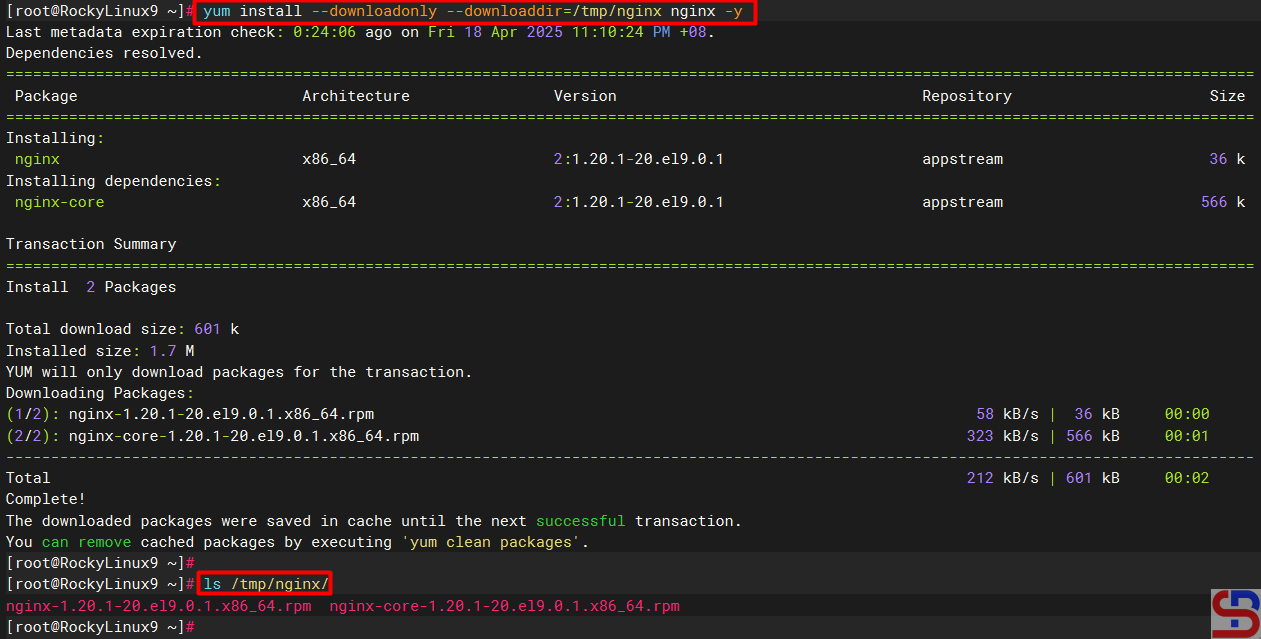
For example, suppose you want to download nginx packages along with their dependencies, and all the packages are contained in the /tmp/nginx folder, use the following command:
yum install --downloadonly --downloaddir=/tmp/nginx nginx -y
After you run the above command, the nginx package and its dependencies files should be in the /tmp/nginx folder as shown below:
By default, if you forget to type the ‐-downloaddir option, it will be stored in the /var/cache/dnf/appstream-*/packages folder.
B. Using yumdownloader
Run the command below to install the yum-utils package:
yum install yum-utils
Then to execute this method, use the format below:
yumdownloader --destdir=/path/in/linux --resolve package_name -y
For example, suppose you want to download a vim package and it is stored in the /root/vim folder, then use the command below:
yumdownloader --destdir=/root/vim --resolve vim -y
After you run the above command, the vim package and its dependencies files should be in the /root/vim folder as shown below:

By default, if you forget to type the ‐-destdir option, the package and its dependencies will be saved in the folder where the command is run. If for example the command is executed in /root then the package and its dependencies files will be stored in the /root folder.
Note
If you have installed a package on the server and you want to download the package along with the dependencies files, but you use the downloadonly plugin then you can’t download the package like in the image below:

so you have to remove the package from the server first and then you can download the package by running the previous command. However, you can still download packages that are already installed on the server if you use yumdownloader. And if you want to install the downloaded package along with its dependency files then go to the downloaded folder and type the command below:
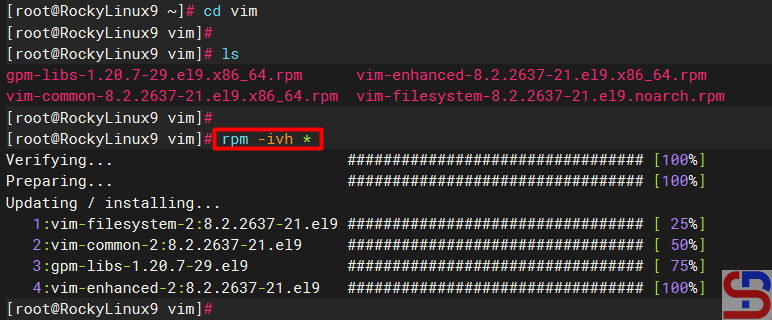
rpm -ivh *
so you can install the package easily and quickly like in the image below: