How to Display the Total Memory Size Used by an Application on Linux?
I want to see the total memory size used by an application on Linux.
Problem
How to display the total memory size used by an application on Linux?
Solution
I usually use top or htop to see the process that occurs in Linux. But I want to be more specific to see how much the total size of the memory used by an application on Linux is. After searching on the internet, 2 tools can be used:
A. Using the ps_mem Tool
The ps_mem tool is used to see the use of memory for a program made by Pixelb at Github. To install this tool, make sure you have a Python package on your Linux device. Use the commands below to install ps_mem:
sudo wget -qO /usr/local/bin/ps_mem https://raw.githubusercontent.com/pixelb/ps_mem/master/ps_mem.py
sudo chmod a+x /usr/local/bin/ps_mem
If your Linux device has python3 and its location at /usr/bin/python3 (to know the location of the python, use whereis python3), use the command below so that this tool can run on your device:
sudo ln -s /usr/bin/python3 /usr/bin/python
After that, type the command below whether the ps_mem tool is running or not:
ps_mem --version
To see the options used in this tool, use the command below:
ps_mem --help
In general, the format used to see the size of a memory used in a Linux application is as follows:
ps_mem -S -p $(pgrep application_name)
For example, if you want to see how much memory size is used in the Firefox application, then type the command below:
ps_mem -S -p $(pgrep firefox)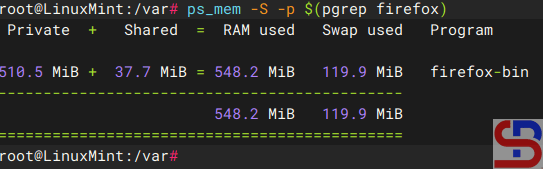
As seen in the picture above, the Firefox application uses memory of 548.2 MB. To see the total memory used per Linux user, you can use the command below:
for i in $(ps -e -o user= | sort | uniq); do
  printf '%-20s%10s\n' $i $(sudo ps_mem --total -p $(pgrep -d, -u $i))
done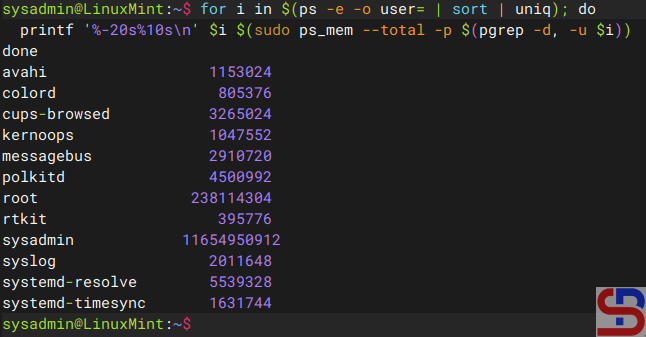
for i in $(ps -e -o user= | sort | uniq); do
bytes=$(sudo ps_mem –total -p $(pgrep -d, -u “$i”) 2>/dev/null)
bytes=${bytes:-0}
mb=$(( bytes / 1048576 ))
printf ‘%-20s%10s MB\n’ “$i” “$mb”
B. Using the smem Tool
This tool provides detailed reports on memory usage per process and per user, as well as providing additional information such as USS (Unique Set Size) that is not available in traditional tools such as top or htop. Below is how to install the smem tool:
Ubuntu/Debian
sudo apt update
sudo apt install smem
RockyLinux/AlmaLinux/CentOS
sudo yum install smem
OpenSUSE
sudo zypper install smem
Type the command below to run a smem command:
smem
Then the display will appear as shown below:
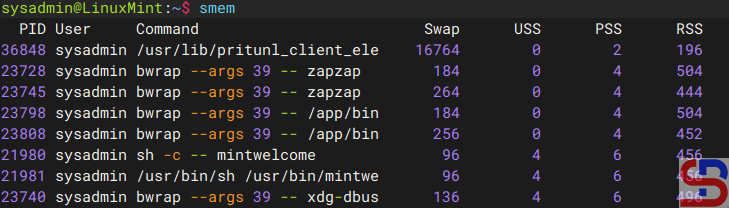
The terms USS, PSS, and RSS can be briefly explained below:
- USS (Unique Set Size) = Memory used exclusively by the process.
- PSS (Proportional Set Size) = Shared memory divided among processes.
- RSS (Resident Set Size) = Total RAM used (including shared).
After that, to display the size of memory used by a Linux application, such as the Vivaldi browser application, you can use the following script:
echo "Vivaldi using memory of $(smem -c "name pss" | grep -i vivaldi | awk -v avail_mem_kb=$(grep MemAvailable /proc/meminfo | awk '{print $2}') -v total_mem_kb=$(grep MemTotal /proc/meminfo | awk '{print $2}') '{sum+=$2} END {if(sum>0) {printf "%.2f MB (%.1f%% of total RAM, %.1f%% of available RAM)", sum/1024, (sum/total_mem_kb)*100, (sum/avail_mem_kb)*100} else {print "0 MB (0% of total RAM, 0% of available RAM)"}}')"
If you want to display the memory size used by more than one application, such as Vivaldi and Brave browser applications, copy the script below:
for app in vivaldi brave; do avail_mem_kb=$(grep MemAvailable /proc/meminfo | awk '{print $2}'); total_mem_kb=$(grep MemTotal /proc/meminfo | awk '{print $2}'); sum=$(smem -c "name pss" | grep -i "$app" | awk '{s+=$2} END {print s+0}'); LC_NUMERIC=C printf "%s using memory of %.2f MB (%.1f%% of total RAM, %.1f%% of available RAM)\n" "$app" "$(echo "$sum/1024" | bc -l)" "$(echo "($sum/$total_mem_kb)*100" | bc -l)" "$(echo "($sum/$avail_mem_kb)*100" | bc -l)"; done
If you want to see the applications on your Linux device that use the most memory, copy the script below where the script will display the 5 Linux applications that use the most memory:
echo; printf "%-20s %12s %16s\n" "Application" "Memory (MB)" "% of Total RAM" && \
smem -c "name pss" | \
awk -v total_mem_kb=$(grep MemTotal /proc/meminfo | awk '{print $2}') \
    '{mem[$1]+=$2} END {for (proc in mem) {
        if (mem[proc] > 0) {
            printf "%-20s %12.1f %15.1f%%\n",
                proc,
                mem[proc]/1024,
                (mem[proc]/total_mem_kb)*100
        }
    }}' | \
sort -k2 -rn | \
head -n 5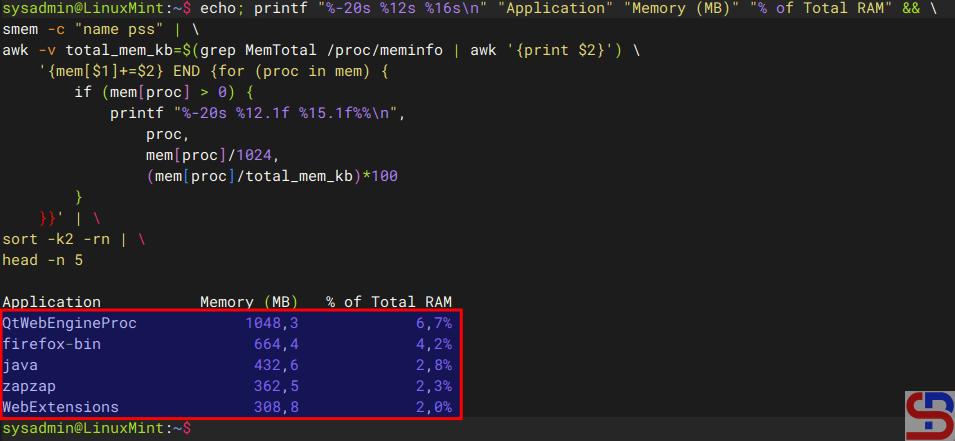
Note
If you compare the results of the two tools, you can see the results obtained are almost the same as in the picture below:

If you want to see the total size of memory used by an application on Linux easily then you can use the ps_mem tool. However, if you want to see a list of Linux applications that use the most memory, you can use the smem application.