The previous article already explained how to create a database and a table in MariaDB. This article will explain how to manage the user(s) in MariaDB.
Problem
How to manage the user(s) in MariaDB?
Solution
Here are the commands to manage user(s) in MariaDB:
1. Display all users
Type the command below to display all the users in MariaDB:
SELECT User,Host FROM mysql.user;
You can see in the picture above that by default, there are only 3 users in MariaDB.
2. Create a user with a password
Use the format below to create a user with a password:
CREATE USER 'username'@'ip_address' IDENTIFIED BY 'password_user';
For example, If you want to create a user with the name james and its password 123456, then type the command below:
CREATE USER 'james'@'localhost' IDENTIFIED BY '123456';
If you want to create a John user with a qwerty password but the user can only access the database via the IP with subnet 192.168.56.0/24, type the command below:
CREATE USER 'john'@'192.168.56.%' IDENTIFIED BY 'qwerty';
But if you also want to create a judith user with a password 1q2w3e4r and the user can access the database from any network, then type the command below:
CREATE USER 'judith'@'%' IDENTIFIED BY '1q2w3e4r';
To see the options for this command, you can go to this page.
4. Rename user
Use the format below to change the user name:
RENAME USER 'username1'@'ip_address' TO 'username2'@'ip_address'
For example, you want to change the name of james to bob by typing the command below:
RENAME USER 'james'@'localhost' TO 'bob'@'localhost';
You can also change the IP address using the command:
RENAME USER 'bob'@'localhost' TO 'bob'@'192.168.56.%';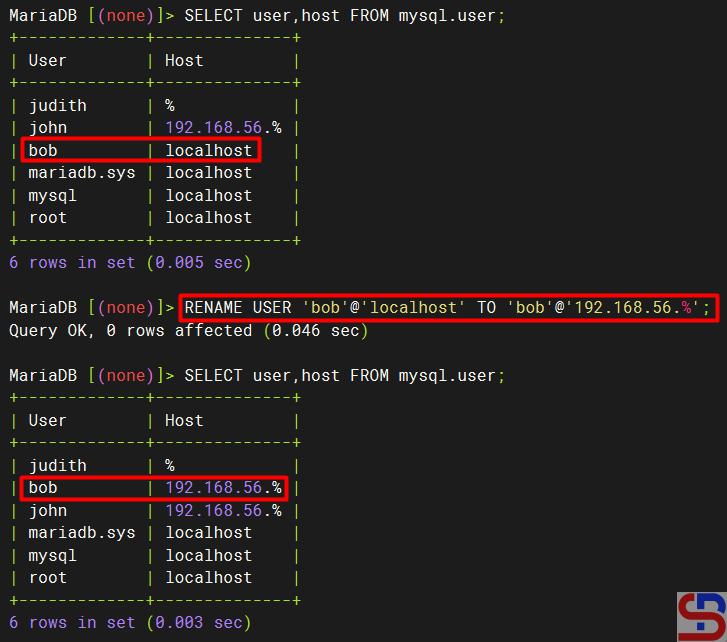
To see the options for this command, you can go to this page.
5. Alter user
Use the format below to change the user in MariaDB:
ALTER USER 'username' option1 option2 ... optionN;
For example, if you want to change the user james’ password, then use the command below:
ALTER USER 'james'@'localhost' IDENTIFIED BY 'qwerty';
To see the options for this command, you can go to this page.
6. Grant a user
If you only make a user in Mariadb without giving access to the user, then the user will not be able to enter the existing database in Mariadb. By default, only the root user gets access to all databases in Mariadb. To add a user to have access, use the format below:
GRANT option1 ON option2 TO 'username'@'ip_address;
Option1 is for privileges options at a database or a table level, and option2 is for which database or table the user can access by the user. To see the options for this command, you can go to this page. For example, the user bob can only access the db_office database and then use the command below:
GRANT ALL ON db_office.* TO 'bob'@'192.168.56.%';
If you want to provide access to the user john to only be able to do the select command for the employee table in the db_office database, then use the command below:
GRANT SELECT ON db_office.employees TO 'john'@'192.168.56.%';
and provide a judith user to access the entire database, use the command below:
GRANT ALL ON *.* TO 'judith'@'%';
You can also combine the grant command by giving a password to a user by typing the command below:
GRANT ALL ON db_office.* TO 'richard'@'192.168.56.%' IDENTIFIED BY 'qwerty';
To see the grant of a user, for example, a judith user, type the command below:
SHOW GRANTS for 'judith';
If you want to see what grant access is given to a user but forget each IP host address from the user-user in MariaDB, then use this command:
select distinct concat('SHOW GRANTS FOR ', QUOTE(user), '@', QUOTE(host), ';') as query from mysql.user;
7. Make a role
By default, if you have many users and sometimes these users have the same access, it is recommended to create a role. A role bundles many privileges together. Use the format below to create a role:
CREATE ROLE role_name;
To see the options in this command, please go to this page. For example, if you want to make a qa and a dev role in MariaDB, then use the command below to make the role:
CREATE ROLE qa;
CREATE ROLE dev;
To see all the roles in MariaDB, use the command below:
SELECT User FROM mysql.user WHERE is_role='Y';
After that, use the grant command to access the db_office database based on the roles as the command below:
GRANT SELECT ON db_office.* TO qa;
GRANT ALL ON db_office.* TO dev;
Then enter the user bob into the qa role and judith into the dev role with the command below:
GRANT qa TO 'bob'@'192.168.56.%';
GRANT dev to 'judith'@'%';
To see users who have entered into the roles in Mariadb, use the command below:
SELECT * FROM mysql.roles_mapping;
8. Delete access
If you want to delete access to a user, whether it’s a role or a grant. Use the format below if you want to delete a user’s role:
REVOKE role_name FROM 'user'@'ip_address';
For example, if you want to delete the qa role from the user bob, use the command below:
REVOKE qa FROM 'bob'@'192.168.56.%';
Use the format below if you want to delete a grant:
REVOKE option1 ON option2 FROM 'user'@'ip_address';
Option1 is for privileges options at a database or a table level, and option2 is for which database or table. If you want to see a deeper explanation of this command, go to this page. For example, if you want to delete richard’s grant in the db_office database, then use the command below:
REVOKE ALL PRIVILEGES ON db_office.* FROM 'richard'@'192.168.56.%';
9. Delete a user
To delete a user, use the format below:
DROP USER username;
If you want to see a deeper explanation of this command, please go to this page. For example, if you want to delete the judith user in MariaDB, then use the command below:
DROP USER judith;
But if you find a user who has 2 names that are the same, but the IP host address is different, then you must use the format below:
DROP USER 'username'@'ip_address';
For example, you want to delete one of the user bobs that has an IP 192.168.56.%, Then use the command below:
DROP USER 'bob'@'192.168.56.%';
Note
To provide grant access to one of the users, it must first be asked what his needs are for accessing a database so that the MariaDB database can be more secure.
References
mariadb.com
gist.github.com
cyberciti.biz
severalnines.com

