How to Display MariaDB Database Metric Values?

I want to see the metric values ​​of my MariaDB database.


Problem

How to display MariaDB database metric values?


Solution

As far as I know, there are 2 tools that you can use to display the values of metrics on your MariaDB database.

1. mariadb-report

This tool is built into MariaDB, so when you install the MariaDB database or mariadb-client on your server, this tool will automatically be installed on your server. In general, use the format below to run this command:

mariadb-report --user=username --password your_password


If you want to display MariaDB database metrics using the root user, then use the command below:

mariadb-report --user=root --password


Enter the password for the root user, and a display will appear as below:

Display of mariadb-report


If you want to put the results into a file, you can use the command below:

mariadb-report --user=root --password --outfile /tmp/metric.txt


Enter the password, and the results will be entered into the /tmp/metric.txt file. 

2. mysqlmonitor

This is a simple bash script created to give system administrators and database administrators a fast summary of MySQL metrics. It presents essential metrics such as InnoDB buffer utilization, query efficiency, and system memory, accompanied by concise descriptions of each parameter. To run this script, you must create MariaDB credentials in the my.cnf file, because if not, there will be an error like the one below:

Error when running mysqlmonitor


Copy the script below and insert it into the my.cnf file:

[client]
user=username
password=your_password


To download and run the script, run the commands below:

curl -O https://raw.githubusercontent.com/haydenjames/mysqlmonitor-script/main/mysqlmonitor.sh && 
chmod +x mysqlmonitor.sh && 
./mysqlmonitor.sh


There will be a display like the image below:

Display of mysqlmonitor


From the image above, you can see that the results from the mysqlmonitor tool are more concise than the mariadb-report tool. To exit this tool, press the q key.


Note

If you want detailed metric results, then you can use the mariadb-report tool. However, if you want more concise metrics, you can use the mysqlmonitor tool.


 

References

linuxblog.io
mariadb.com
github.com


How to Install and Run tuning-primer?

The previous article explained the mysqltuner script to provide recommendations to increase MariaDB performance. This article will explain the primary-tuning script, which is an alternative or may also be an addition to providing recommendations for MariaDB.


Problem

How to install and run tuning-primer?


Solution

The primary-tuning script was created by Matthew Montgomery using a bash script to provide recommendations against a MySQL/MariaDB database. This script takes information from “SHOW STATUS LIKE…” and “SHOW VARIABLES LIKE…” to produce recommendations for tuning server variables. To download this script, use the command below:

git clone https://github.com/mattiabasone/tuning-primer.git


Go to the primary-tuning folder and permit so that the script can be run:

chmod +x tuning-primary.sh


Then, run the command below to run the primary-tuning script:

./tuning-primer.sh


There will be a display like the image below:

Run tuning-primer script


Press Enter, then you have to enter your username and password so that this script can access your MariaDB database, as in the image below:

Enter username and password


Warning
This script writes the password clearly, so you have to be careful when using this script.


After that, the script will display recommendations as in the image below:

tuning-primer script result display


Note

Because this script was created in 2018 and there has been no update, there are several errors that occur where on lines 1482 and 1483 (see first image) in the netstat command where at this time (November 2025), the netstat command has been changed to ss and also the password is written as plain text which is very dangerous if known by the unauthorized user.


References

linuxblog.io
github.com


How to Install And Run mysqltuner?

If you have a MariaDB database, then you definitely want the performance of the database to improve. Therefore, you should have done several configurations to achieve your goals. There is a script called mysqltuner that you can use to improve the performance of your MariaDB database by providing recommendations.


Problem

How to install and run mysqltuner?


Solution

mysqltuner is a Perl script designed to quickly assess a MySQL setup and implement changes to enhance performance and stability. It supports ~300 indicators for MySQL/MariaDB/Percona Server in this latest version and is actively maintained, supporting many configurations such as Galera Cluster, TokuDB, Performance schema, Linux OS metrics, InnoDB, MyISAM, Aria, and so on. To download it, you can run the command:

git clone https://github.com/major/MySQLTuner-perl.git


Or use the commands below:

wget http://mysqltuner.pl/ -O mysqltuner.pl
wget https://raw.githubusercontent.com/major/MySQLTuner-perl/master/basic_passwords.txt -O basic_passwords.txt
wget https://raw.githubusercontent.com/major/MySQLTuner-perl/master/vulnerabilities.csv -O vulnerabilities.csv


To run this script, you must have Perl installed on your server. So, to run this script, you can use the command (if you download mysqltuner using git, you have to go to the MySQLTuner-perl folder):

perl mysqltuner.pl


Or you permit this script to be executed by using the command:

chmod +x mysqltuner.pl
./mysqltuner.pl


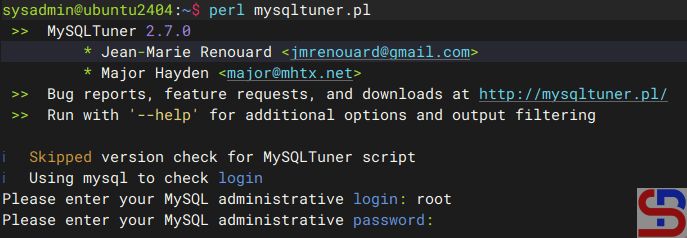
After you run the command, there will be a display as below:

Enetr username and password


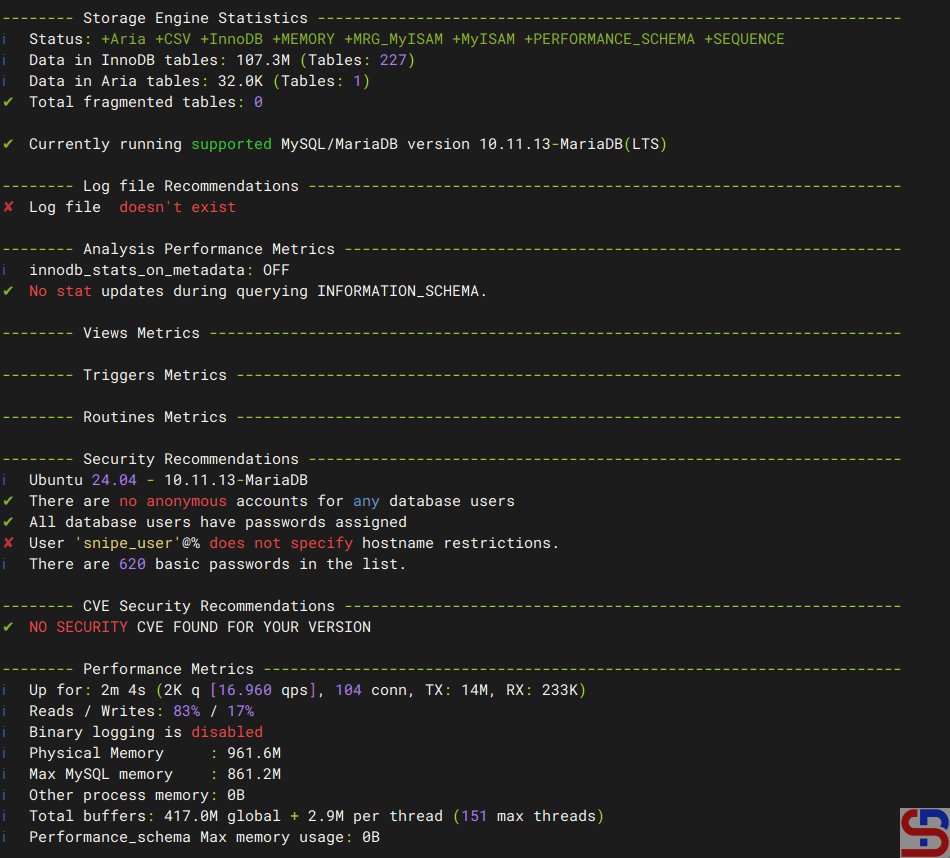
Enter the username and password, and if there is no error, mysqltuner displays your MariaDB state as shown in the image below:

mysqltuner view


And at the end, mysqltuner will recommend that your MariaDB improve its performance:

Recommendations on mysqltuner


Note

If you want to run mysqltuner with the verbose option, use the command below:

perl mysqltuner.pl --verbose


If you want to display Maximum Output Information around MySQL, like display database(s) and table(s) on mysqltuner, use the command below:

perl mysqltuner.pl --buffers --dbstat --idxstat --sysstat --pfstat --tbstat


Use the command below to use CVE(Common Vulnerabilities and Exposures) in mysqltuner:

perl mysqltuner.pl --cvefile=vulnerabilities.csv


Use the command below to save the results from mysqltuner in a file without displaying it on the screen:

perl mysqltuner.pl --silent --outputfile /tmp/result_mysqltuner.txt


To update mysqltuner, run the command below:

perl mysqltuner.pl --checkversion --updateversion


References

mysqltuner.com
github.com
hevodata.com


How to Change MariaDB Port?

By default, MariaDB uses port 3306. I want to change the default port to another port for security reasons.


Problem

How to change MariaDB port?


Solution

To see the default MariaDB port, you can use the command below:

sudo ss -ptuln | grep mariadb

Display the MariaDB port via netstat


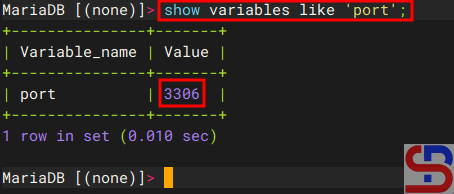
Or you run the query below:

show variables like 'port';

Display the MariaDB port via query


From the images above, you can see MariaDB is using port 3306. If you want to change the port from 3306 to 4306, for example, then in the file /etc/mysql/mariadb.conf.d/50-server.cnf if you are using Ubuntu, add the item below:

port                    = 4306


Warning
If you’re using a distro other than Ubuntu/Debian, you can search for the file by using the command:

sudo find / -type f -name "*server.cnf"


Then restart mariadb using the command:

sudo systemctl restart mariadb


After that, you can check the MariaDB port by using one of the commands above, and the MariaDB port should have changed according to the port you want, as shown in the image below:

change MariaDB port
Display the MariaDB port via netstat after changing the port


Note

If you have changed the default port of MariaDB from 3306 to 4306, for example, then you don’t need to write the port in the Linux command to access MariaDB if you access from localhost:

change MariaDB port
Access to MariaDB after changing the port from localhost


But, if you access MariaDB from another host, you have to write the option for the port, like in the picture below:

Access to MariaDB after changing the port on another host


References

geeksforgeeks.org
stackoverflow.com
tecmint.com


How to Change the Default Port in PostgreSQL?

By default, PostgreSQL uses port 5432. But for security’s sake, I want to change the default port to another one.


Problem

How to change the default port in PostgreSQL?


Solution

If you want to see the port used by PostgreSQL, you can see it in the postgresql.conf file by using the command (I’m using Ubuntu distro and PostgreSQL version 18):

cat /etc/postgresql/18/main/postgresql.conf | grep 'port ='

Display the PostgreSQL port via postgresql.conf file


Or you can use the command below to see the PostgreSQL port:

sudo ss -ptuln | grep postgres

Display the PostgreSQL port via netstat


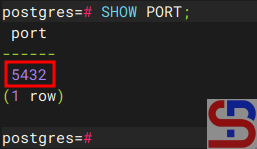
Or you can use the query in this post to see the port used by PostgreSQL:

SHOW PORT;

change the default port in PostgreSQL
Display the PostgreSQL port via query


From the images above, you can see that PostgreSQL uses port 5432. If you want to change the PostgreSQL port to port 6543, for example, then go to the /etc/postgresql/18/main/postgresql.conf file if you use the Ubuntu distro and PostgreSQL version 18, and change the port value from 5432 to 6432.

Warning
If you’re using a distro other than Ubuntu/Debian, you can search for the postgresql.conf file by using the command:

sudo find / -type f -name "*postgresql.conf"


Then restart PostgreSQL using the command:

sudo systemctl restart postgresql


After that, you can check the PostgreSQL port by using one of the commands above, and the PostgreSQL port should have changed according to the port you want as shown in the image below:

Display the PostgreSQL port via netstat after changing the port


Note

If you have changed the default port of PostgreSQL from 5432 to 6432, for example, then you don’t need to write the port in the Linux command to access PostgreSQL if you access from localhost: 

Access PostgreSQL from localhost after changing the default port


But, if you access PostgreSQL from another host, you have to write the option for the port, like in the picture below:

Access PostgreSQL from another host after changing the default port


References

stackoverflow.com
dbvis.com
geeksforgeeks.org


How to Install postgresql-client on Linux?

Just as MariaDB requires the mariadb-client package to connect other hosts to a MariaDB database, PostgreSQL also requires the postgresql-client package to connect other hosts to a PostgreSQL database.


Problem

How to install postgresql-client on Linux?


Solution

Below is the command to install postgresql-client on some Linux distributions:

Ubuntu/Debian

sudo apt update
sudo apt install postgresql-client


RockyLinux/AlmaLinux/RHEL/CentOS

sudo yum install postgresql-client


Then run the command below to see the installed PostgreSQL version:

psql --version

Check PostgreSQL version


As you can see in the image above, the version of postgresql-client that you installed is version 16.10. But you should know that, usually by default, the package provided by the distro is a stable old version and not the latest stable version. Therefore, if you want the mariadb-client package to use the latest stable version, use the command below if you use a Ubuntu/Debian distro:

sudo apt install -y postgresql-common
sudo /usr/share/postgresql-common/pgdg/apt.postgresql.org.sh


Then run the command below to install the latest version of postgresql-client (The last version of postgresql in November 2025 is version 18.0):

sudo apt install postgresql-client-18


If your distro is using RockyLinux/AlmaLinux/RHEL version 10, use the command below to upgrade the postgresql-client package to the latest version:

sudo dnf remove -y postgresql
sudo dnf install -y https://download.postgresql.org/pub/repos/yum/reporpms/EL-10-x86_64/pgdg-redhat-repo-latest.noarch.rpm
sudo dnf clean all
sudo dnf makecache
sudo dnf install -y postgresql18


Note

If you want to know how to access the MariaDB database from another host, you can go to this article.


References

postgresql.org
docs.risingwave.com
dewanahmed.com


How to Access a MariaDB Database From Another Host?

The previous article already explained how to access a MariaDB database from localhost. This article will explain how to access the MariaDB database from another host.


Problem

How to access a MariaDB database from another host?


Solution

To access the MariaDB database, you can follow the format below:

mariadb -h your_server_ip -u username -P port_number -p


By default, the MariaDB database uses port 3306, so if your MariaDB database uses port 3306, then there is no need to write the port when executing the command to access the MariaDB database. I have a MariaDB database server with an IP of 192.168.56.101 and an Ubuntu server with an IP of 192.168.56.11. I want to access the MariaDB database via the Ubuntu server using the user john and run the command:

mariadb -h 192.168.56.101 -u john -p


But I got an error like below:

ERROR 2002 (HY000): Can’t connect to server on ‘192.168.56.101’ (115)

Error when accessing the MariaDB from another host


Below are the steps to access the MariaDB database:

1. Open the port

Open port 3306 on both servers. If you use RockyLinux/AlmaLinux/RHEL for your servers, use the command below:

firewall-cmd --add-port=3306/tcp --permanent
firewall-cmd --reload


But if you use Ubuntu/Debian for your server, type the command below:

sudo ufw allow 3306


2. Check the MariaDB version

You should know that to access the MariaDB database, you need a mariadb-client package whose version is the same as the MariaDB database version. If the mariadb-client version is different from the mariadb database version, then there will usually be an error. To install the mariadb-client package, you can go to this page.


3. Grant access

On the database server, run a query with the format below:

GRANT option ON db_name.* TO username@"ip_address" IDENTIFIED BY "password";


For example, if user john wants to access the entire MariaDB database from the host with IP 192.168.56.11, then use the query below:

GRANT ALL ON *.* TO john@"192.168.56.11" IDENTIFIED BY "123456";

Grant access for user john


Warning
If you want user john to be able to access only the Zabbix database, use the query below:

GRANT ALL ON zabbix.* TO john@"192.168.56.101" IDENTIFIED BY "qwerty";


And use the query below if you want user john to be able to view only the Zabbix database:

GRANT SELECT ON zabbix.* TO john@"192.168.56.101" IDENTIFIED BY "qwerty";


4. Configure the file

Go to the file /etc/mysql/mariadb.conf.d/50-server.cnf and change the bind-address item to be as below:

bind-address             = 0.0.0.0


Warning
You can also change the bind-address item in the /etc/mysql/my.cnf file by adding the following script to the file:

[mysqld]
bind-address = 0.0.0.0


5. Restart MariaDB

After that, restart the MariaDB service using the command below:

sudo systemctl restart mariadb


Then, try to access it again, and you should be able to access the database like in the picture below:

Succeed to access MariaDB from another host


Note

If you want your MariaDB database to only be accessed from a certain IP, for example, IP 192.168.56.11, then use the command below if your distro uses Ubuntu/Debian:

sudo ufw allow from 192.168.56.11 to any port 3306


But, if you use RockyLinux/AlmaLinux/RHEL, type the below command to open port 3306 only from IP 192.168.56.11

firewall-cmd --zone=public --add-rich-rule 'rule family=ipv4 source address=192.168.56.11 port port=3306 protocol=tcp accept'
firewall-cmd --reload
firewall-cmd --list-rich-rules


References

mariadb.com
tencentcloud.com
webdock.io