How to Make a Tool Like Molly-Guard Using a Bash Script?
The previous article explained how the Molly-Guard tool can protect Linux servers from accidental reboot or shutdown commands. Unfortunately, this tool is only available on Debian/Ubuntu distros and their derivatives, while sysadmins generally have many Linux servers from various distros.
Problem
How to make a tool like Molly-Guard using a bash script?
Solution
To create a tool like Molly-Guard, you can use a bash script, and this script has been tested on Ubuntu Server 24.04, RockyLinux9, and OpenSUSE 15 distros. And this script should be applied throughout the Linux distro to replace the Molly Guard tool. Here are the steps:
1. Check the paths
First, check where the reboot, shutdown, poweroff, and halt commands are located on the Linux server by running the command below:
whereis -b reboot
whereis -b shutdown
whereis -b poweroff
whereis -b halt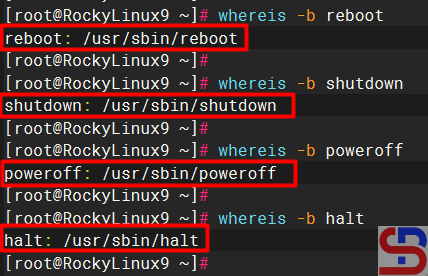
As far as I know, Linux distributions such as RockyLinux and Ubuntu only provide one binary file for each command for the reboot, shutdown, poweroff, or halt command, usually in the folder /usr /sbin. However, on certain distros, for example, the OpenSUSE distro, when you run the command above, the result will be as shown in the image below:
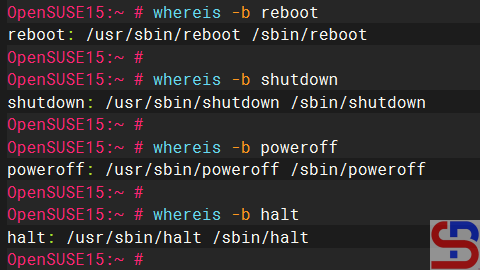
From the image above, you can see that 2 files represent each of these commands. Because this article uses the commands in the /usr/sbin folder, you can rename the commands in the /sbin folder using the commands below:
mv /sbin/reboot /sbin/reboot_backup
mv /sbin/shutdown /sbin/shutdown_backup
mv /sbin/poweroff /sbin/poweroff_backup
mv /sbin/halt /sbin/halt_backup
2. Create a bash script
Copy the bash script below into the /usr/local/bin/ folder and give it a molly-guard-costume.sh name:
#!/usr/bin/env bash

# molly-guard-custome.sh: Prevent accidental reboot or shutdown like molly-guard tool

##########################################################################################
# The functions

check_hostname_reboot() {
# Compare the user input with the actual hostname
if [ "$USER_INPUT" == "$ACTUAL_HOSTNAME" ]; then
        echo "Hostname confirmed."
        echo
        sleep 1
        echo "Proceeding with the command..."
        echo
        sleep 1
        echo "The system will reboot now!"
        echo
        sleep 1
        /usr/sbin/reboot_server
else
        echo "Hostname mismatch. Aborting the reboot operation."
        exit 1
fi
}

check_hostname_halt() {
# Compare the user input with the actual hostname
if [ "$USER_INPUT" == "$ACTUAL_HOSTNAME" ]; then
        echo "Hostname confirmed."
        echo
        sleep 1
        echo "Proceeding with the command..."
        echo
        sleep 1
        /usr/sbin/halt_server
else
        echo "Hostname mismatch. Aborting the halt operation."
        exit 1
fi
}

check_hostname_poweroff() {
# Compare the user input with the actual hostname
if [ "$USER_INPUT" == "$ACTUAL_HOSTNAME" ]; then
        echo "Hostname confirmed."
        echo
        sleep 1
        echo "Proceeding with the command..."
        echo
        sleep 1
        echo "The system will reboot now!"
        echo
        sleep 1
        /usr/sbin/poweroff_server
else
        echo "Hostname mismatch. Aborting the poweroff operation."
        exit 1
fi
}

check_hostname_shutdown() {
# Compare the user input with the actual hostname
if [ "$USER_INPUT" == "$ACTUAL_HOSTNAME" ]; then
        echo "Hostname confirmed."
        echo
        sleep 1
        echo "Proceeding with the command..."
        echo
        sleep 1
        echo "The system will reboot now!"
        echo
        sleep 1
        /usr/sbin/shutdown_server
else
        echo "Hostname mismatch. Aborting the shutdown operation."
        exit 1
fi
}

##########################################################################################

# Get the actual system hostname
ACTUAL_HOSTNAME=$(hostname)

# Ask the user to input the hostname
echo "Please confirm the hostname to proceed it."
read -p "Enter the hostname: " USER_INPUT

# Check the command
ps aux | grep reboot > /tmp/reboot.txt
ps aux | grep halt > /tmp/halt.txt
ps aux | grep poweroff > /tmp/poweroff.txt
ps aux | grep shutdown > /tmp/shutdown.txt

reboot_size=`ls -al /tmp/reboot.txt | awk '{print $5}'`
halt_size=`ls -al /tmp/halt.txt | awk '{print $5}'`
poweroff_size=`ls -al /tmp/poweroff.txt | awk '{print $5}'`
shutdown_size=`ls -al /tmp/shutdown.txt | awk '{print $5}'`

# Compare the command

if [ $reboot_size -gt 90 ];
then
        rm -f /tmp/reboot.txt /tmp/halt.txt /tmp/poweroff.txt /tmp/shutdown.txt
        check_hostname_reboot
elif [ $shutdown_size -gt 90 ];
then
        rm -f /tmp/reboot.txt /tmp/halt.txt /tmp/poweroff.txt /tmp/shutdown.txt
        check_hostname_shutdown
elif [ $poweroff_size -gt 90 ];
then
        rm -f /tmp/reboot.txt /tmp/halt.txt /tmp/poweroff.txt /tmp/shutdown.txt
        check_hostname_poweroff
elif [ $halt_size -gt 90 ];
then
        rm -f /tmp/reboot.txt /tmp/halt.txt /tmp/poweroff.txt /tmp/shutdown.txt
        check_hostname_halt
fi
Then run the command below so that it can be run:
chmod +x /usr/local/bin/molly-guard-costume.sh
3. Copy the commands
Use the commands below to copy the commands :
file_path=$(whereis -b "reboot" | cut -d ' ' -f 2);sudo cp $file_path ${file_path}_server > /dev/null 2>&1
file_path=$(whereis -b "shutdown" | cut -d ' ' -f 2);sudo cp $file_path ${file_path}_server > /dev/null 2>&1
file_path=$(whereis -b "poweroff" | cut -d ' ' -f 2);sudo cp $file_path ${file_path}_server > /dev/null 2>&1
file_path=$(whereis -b "halt" | cut -d ' ' -f 2);sudo cp $file_path ${file_path}_server > /dev/null 2>&1
To see the result, type the command below:
ls -al /usr/sbin/ | grep server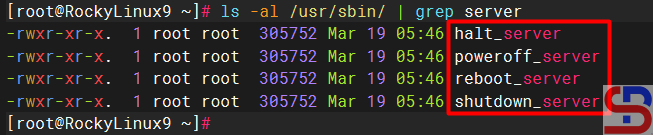
4. Link the script to the commands
Then, link the bash script to the commands by running the command below:
ln -sf /usr/local/bin/molly-guard-costume.sh /usr/sbin/reboot
ln -sf /usr/local/bin/molly-guard-costume.sh /usr/sbin/shutdown
ln -sf /usr/local/bin/molly-guard-costume.sh /usr/sbin/poweroff
ln -sf /usr/local/bin/molly-guard-costume.sh /usr/sbin/halt
To see the results, type the command below:
ls -al /usr/sbin/ | grep molly
5. Test the result
Now, try to do the reboot command and write the wrong hostname, and your Linux server shouldn’t reboot. However, try to write the correct hostname, then your Linux server should be rebooted, like in the image below:
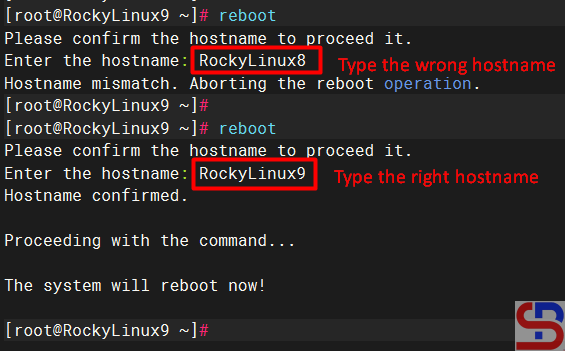
You should get the same results when running other commands such as poweroff, shutdown, and halt.
Note
Unlike the Molly-Guard tool, this script will continue to work even though you run the reboot or shutdown command without an SSH connection or directly connect the keyboard to the Linux server.