Cache memory is a type of data storage used to store frequently accessed information for faster response time, and it’s used to improve system performance. In Linux, the kernel uses the buff/cache memory to improve system performance by caching frequently accessed data (disk blocks, inodes, etc.) and buffering I/O operations. So if you have an application that is often used and accessible to many people, you will see that the memory cache on the server will often be used. But sometimes, because of necessity, you have to clean the cache memory.
Problem
How to clear cache memory on Linux?
Solution
Before you delete the cache memory on Linux, you must know some of the terms related to the cache memory:
- Buffer: stores disk blocks that have been recently accessed or modified.
- PageCache: It improves file I/O performance by storing often-used file data in RAM.
- Dentries: help speed up file name searches by storing cached directory entries.
- Inodes: store important metadata about files and directories, they are also separate from the content or names.
So if you want to delete cache memory, use the format below:
sync; echo 1-3 > /proc/sys/vm/drop_caches
The sync command to clear the buffer and the drop_caches file controls which type of cached data should be cleared and the values are as follows:
- 1 – Clears only the page cache.
- 2 – Clears dentries and inodes.
- 3 – Clears page cache, dentries, and inodes.
So if you want to delete cache memory, use the format below:
sync; echo 3 > /proc/sys/vm/drop_caches
And the cache memory on your Linux server will be deleted as shown below:
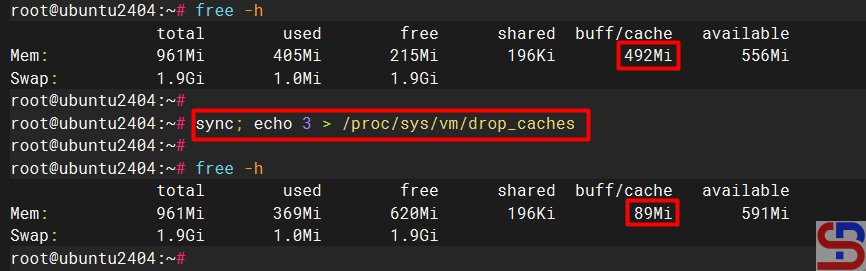
sudo sync; sudo sh -c ‘echo 3 >/proc/sys/vm/drop_caches’
Note
It is not dangerous if you run the command to delete the memory cache on Linux but this will cause an increase in I/O disk because of the request that is usually handled by the memory cache because the memory cache is cleaned so that the request will immediately proceed to the hard disk, causing an increase I/O disk. Also on the application side will cause a decrease in performance because the application does not receive a response from the memory cache, but must receive a response from the hard disk, whose response time is slower than from the cache memory.
References

