The previous article explained how to see the status of a public IP, whether it is indicated as spam or not, using a PHP script. This article will explain the status of a public IP that is indicated as spam or does not use bash scripts.
Problem
How to check a public IP in the spam list using a bash script?
Solution
To run the bash script to check whether a public IP address in the spam list is spam or not, you must install the required packages below:
Ubuntu/Debian
apt-get install -y dnsutils
RHEL/CentOS/RockyLinux/AlmaLinux
yum install bind-utils -y
Then copy the bash script below and give the name check_ip_spam.sh:
#!/usr/bin/env bash
# -- $Id: blcheck,v 1.4 2007/06/16 01:08:10 j65nko Exp $ --
# Check if an IP address is listed on one of the following blacklists
# The format is chosen to make it easy to add or delete
# The shell will strip multiple whitespace
BLISTS="
bl.spamcop.net
cbl.abuseat.org
dnsbl.justspam.org
dnsbl.sorbs.net
relays.mail-abuse.org
spam.dnsbl.sorbs.net
spamguard.leadmon.net
zen.spamhaus.org
"

# simple shell function to show an error message and exit
# $0 : the name of shell script, $1 is the string passed as argument
# >&2 : redirect/send the message to stderr
ERROR() {
echo $0 ERROR: $1 >&2
exit 2
}

# -- Sanity check on parameters
[ $# -ne 1 ] && ERROR 'Please specify a single IP address'

# -- if the address consists of 4 groups of minimal 1, maximal digits, separated by '.'
# -- reverse the order
# -- if the address does not match these criteria the variable 'reverse will be empty'
reverse=$(echo $1 |sed -ne "s~^\([0-9]\{1,3\}\)\.\([0-9]\{1,3\}\)\.\([0-9]\{1,3\}\)\.\([0-9]\{1,3\}\)$~\4.\3.\2.\1~p")
if [ "x${reverse}" = "x" ] ; then
ERROR "IMHO '$1' doesn't look like a valid IP address"
exit 1
fi

# Assuming an IP address of 11.22.33.44 as parameter or argument
# If the IP address in $0 passes our crude regular expression check,
# the variable ${reverse} will contain 44.33.22.11
# In this case the test will be:
# [ "x44.33.22.11" = "x" ]
# This test will fail and the program will continue
# An empty '${reverse}' means that shell argument $1 doesn't pass our simple IP address check
# In that case the test will be:
# [ "x" = "x" ]
# This evaluates to true, so the script will call the ERROR function and quit
# -- do a reverse ( address -> name) DNS lookup
REVERSE_DNS=$(dig +short -x $1)
echo IP $1 NAME ${REVERSE_DNS:----}
EXITCODE=0

# -- cycle through all the blacklists
for BL in ${BLISTS} ; do

# print the UTC date (withour linefeed)
printf $(env TZ=UTC date "+%Y-%m-%d_%H:%M:%S_%Z")

# show the reversed IP and append the name of the blacklist
printf "%-40s" " ${reverse}.${BL}."

# use dig to lookup the name in the blacklist
#echo "$(dig +short -t a ${reverse}.${BL}. | tr '\n' ' ')"
LISTED="$(dig +short -t a ${reverse}.${BL}.)"
echo [${LISTED:-OK}]
echo $LISTED | grep '127\.' >/dev/null && EXITCODE=4
done
exit $EXITCODE
# --- EOT ------
Type the command below so that the bash script can run:
chmod +x check_ip_spam.sh
To run this bash script, use the format below:
./check_ip.sh public_IP_address
For example, you want to check IP 172.217.194.113, then run the script by:
./check_ip.sh 172.217.194.113
And there will be the following display:
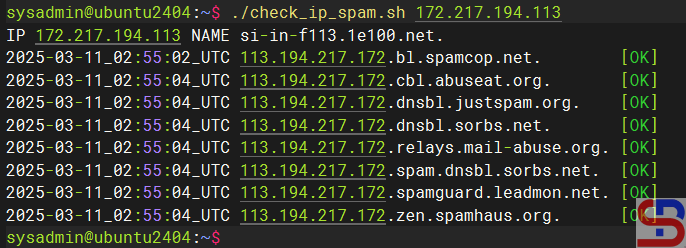
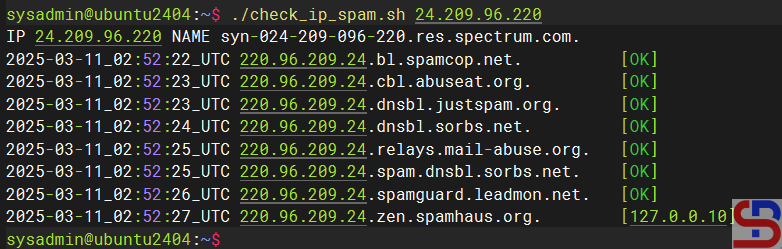
From the image above, it can be seen that the public IP does not include spam. If a public IP is included in the spam list, for example, IP 24.209.96.220, it will come out [127.0.0.x] as in the image below:
If you want to check over one IP, then use the syntax format:
for X in public_ip_address_1 public_ip_address_2 ...; do echo;./check_ip $X; echo; done
For example, if you want to check two public IP addresses, 172.217.194.113 and 24.209.96.220, you can type:
for X in 172.217.194.113 24.209.96.220 ; do echo; ./check_ip.sh $X ;echo; done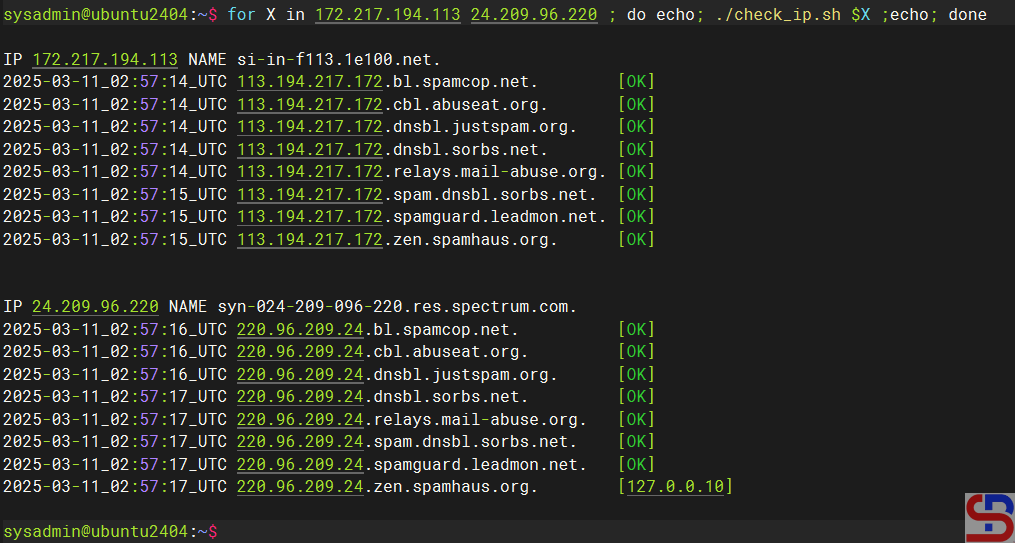
Note
If you want to change the DNSBL or Domain Name System Blacklists list, then you can change it in lines 7-14 of the scrip,t and you can add the DNSBL list here. The more you enter the DNSBL list, the more valid the output will be.
References
daemonforums.org
maxmind.com
cyberciti.biz
tecmint.com

