If you have been a sysadmin in a company for a long time, then you will usually change the Linux server settings according to what you want, for example, you create a recycle bin in your Linux server. If there is a new sysadmin, it will take a long time to explain what you are changing. Therefore, you plan to create a readme.txt file on the Linux server that contains the changes you made on the Linux server and automatically copy a file during Linux user creation.
Problem
How to automatically copy a file during Linux user creation?
Solution
Go to the /etc/skel folder, which contains files and directories. If a new Linux user is created, all the files and directories in this folder will be copied to the Linux user’s folder. Below is an image of the contents of the skel folder in the RockyLinux distro, and the contents of the skel folder can be different in each Linux distro:

If you want to copy a file to each new Linux user, create the file in the /etc/skel folder. For example, you create a readme.txt file like the following command:
echo 'This is a readme.txt file' > /etc/skel/readme.txt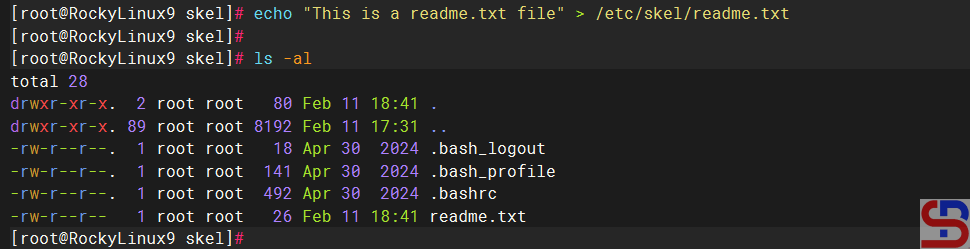
After that, create a new Linux user, for example, bob. Use the command below to create a user named bob on Linux:
useradd -m bob
The -m option tells useradd to create the user’s home directory. Then, check the bob folder if the readme.txt file is in the bob folder by using the command below:
ls -l /home/bob
cat /home/bob/readme.txt
From the image above, you can see that the readme.txt file is already in the bob folder automatically. To be more sure, try creating a new Linux user, and the readme.txt file should appear in your new user.
Note
Make sure to use the -m option when creating a new user in Linux so that the file(s) or folder(s) can be automatically copied from the skel folder.
References

