By default, if a server containing Docker reboots, all Docker containers on that server will shut down. If the server has a lot of containers, you will have to manually turn them on, which is highly exhausting.
Problem
How to run a container automatically after the server reboots?
Solution
In Docker, the restart policy specifies when and how the Docker container will be automatically restarted in the event of a system failure, shutdown, or reboot. There are 4 types of restart policies that you can use:
Restart Policy in Docker
| Option | Description |
| no | Never restarts automatically and this is a default policy |
| on-failure | Restart only if the exit code ≠ 0 (fail). Can be added to the maximum restart (on-failingure: 5). |
| always | Always restart the container, unless it is stopped manually (docker stop), including when rebooting the server. |
| unless-stopped | Similar to the always option, but it won't restart if the container is stopped manually, even after a reboot. |
By default, Docker uses the no option for the restart policy so that the container won’t turn on when the server boots. There are several methods to automatically turn on containers after the server reboots:
1. If your container is still not running
Use the format below if you run a container and you want it to turn on automatically after restarting the server:
docker run -d ‐-restart restart_option your_docker_image
If your container name is a webserver that uses the nginx image and you want the container to run automatically after the server reboots, you can use the command below:
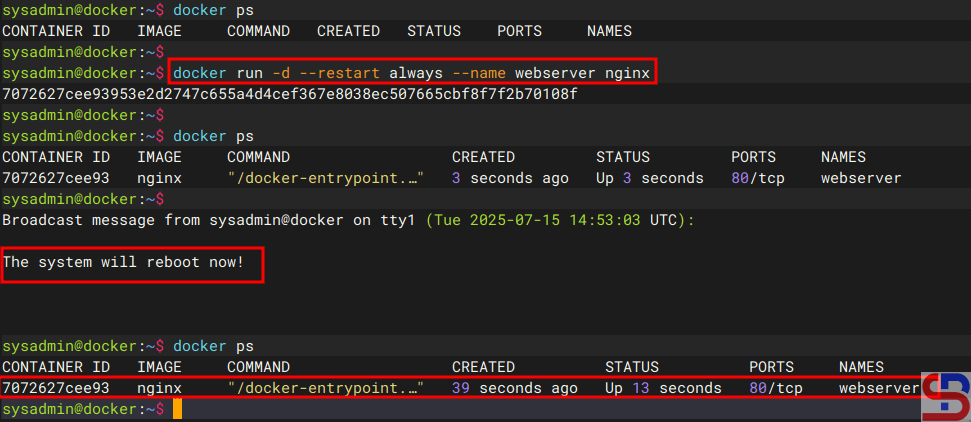
docker run -d --restart always --name webserver nginx
Once the container is running, try restarting the server, and it should continue to run automatically after the server restart, like in the image below:
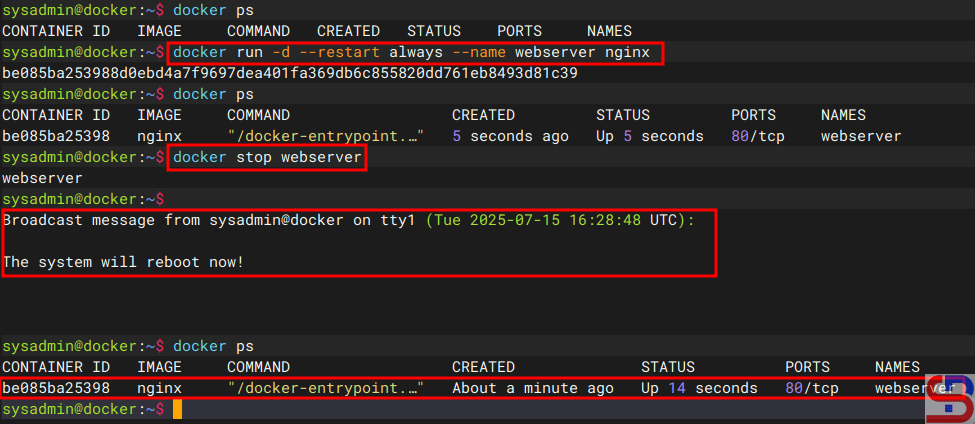
Now, try to stop the container and restart the server, and then the container should still run automatically after the server restarts, like in the image below:
2. If your container is running
If a container is running but has not used the restart option, you can use the format below so that the container can run automatically after the server restarts:
docker update --restart unless-stopped container_name_or_id
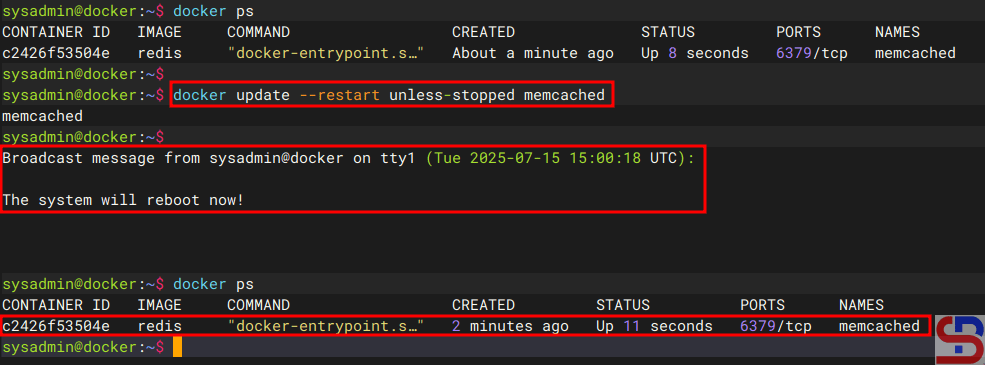
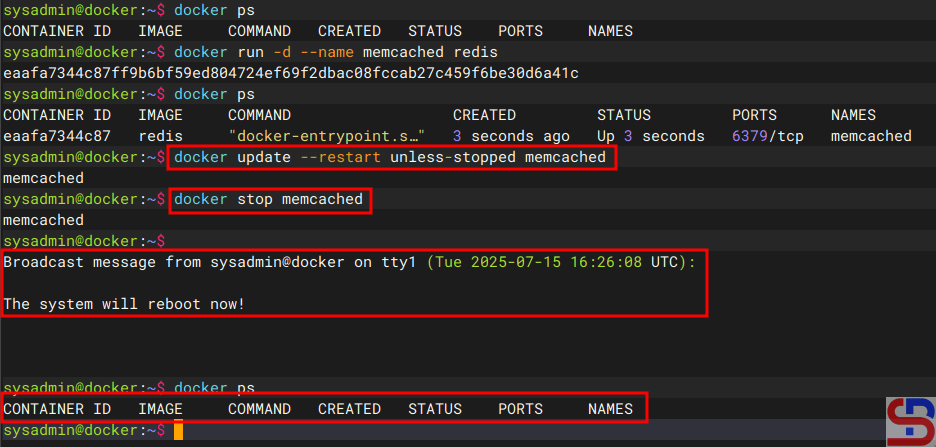
For example, you see a memcached container that uses a redis image is already running on the server, but has not used the restart option. Use the command below if you want the container to keep running after the server restarts, but if the container previously stopped, then at the time of the server restart, the container still won’t run:
docker update --restart unless-stopped memcached
Now, try restarting the server while the container is running, and then the container should still run automatically if the server reboots, like in the image below:
Now, try to stop the container and then restart the server; the container should still not run after the server restarts, like in the image below:
3. Using crontab
The third method of using crontab is to enter the following formats into crontab:
@reboot /usr/bin/docker start container_name_or_id
For example, you want to run the webserver container automatically after restarting the server, so insert the script below into the crontab :
@reboot /usr/bin/docker start webserver
If a container uses a crontab to keep it running after restarting the server, it will continue to run after restarting the server, even if it uses the unless-stopped option and the container is not running before the server is restarted.
Note
If you want a container to run automatically after restarting the server, it is important to note the distinction between using the always and unless-stopped parameters. If the container is a very important application, such as a webserver or database, use the always option for the container, but use the unless-stopped option if the container is a non-essential application.
References
docs.docker.com
stackoverflow.com
betterstack.com
baeldung.com

