The previous article explained how to change the SSH port. Nevertheless, after I changed the port, I could not access the server via SSH using the new port.
Problem
How to access the server via SSH after changing the SSH port?
Solution
Let’s say you have changed the SSH port from port 22 to port 43210 by changing it in the /etc/ssh/sshd_config file and checking the port by typing the command below:
sudo grep -E "^Port" /etc/ssh/sshd_config
After that, restart the SSH using the command below:
sudo systemctl restart sshd
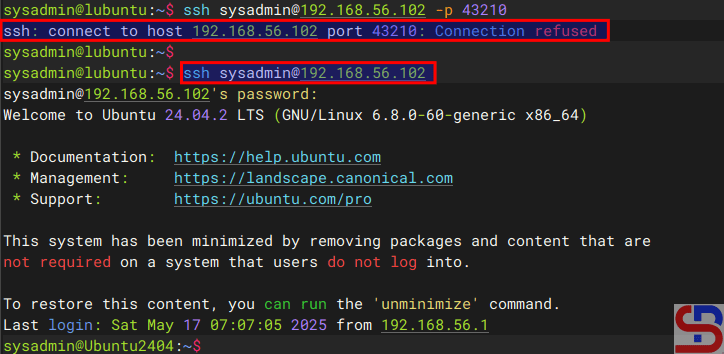
However, you can’t access the server via SSH using port 43210 but can still access via SSH port 22 as shown in the image below:
In the remote, type the command below to check if the SSH port has changed to Port 43210 or not:
sudo ss -tulnp | grep sshd
If you find the result as shown in the image below:

It means the SSH is still connected to port 22 and not to port 43210. Therefore, type the commands below:
sudo systemctl stop ssh.socket
sudo systemctl disable ssh.socket
sudo systemctl mask ssh.socket
sudo systemctl restart sshd
Run the previous command to check the port:
sudo ss -tulnp | grep sshd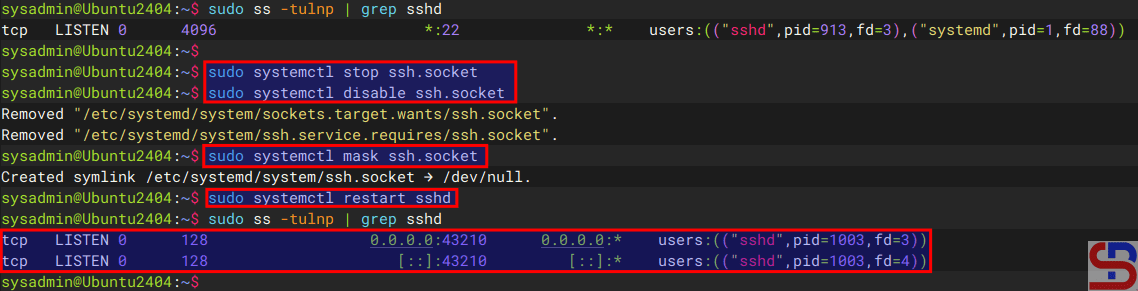
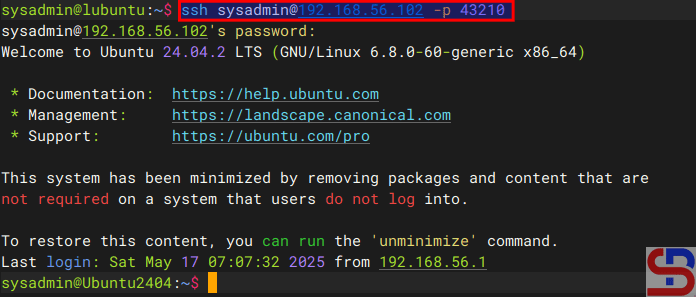
You can see in the image above that the SSH port has changed to port 43210 and you should be able to access the server via SSH using port 43210.
Note
The socket statistics, or ss, is a tool to display network socket information. This tool has the same function as netstat but has several advantages such as faster, filtering by connection state (e.g., established, time-wait), debugging high-performance networks, and so on.
References
askubuntu.com
rome-rohani.medium.com
discourse.ubuntu.com
community.clearlinux.org
redhat.com

